Data structures and algorithms

The C++ standard library contains many common data structures that are useful when implementing your application. Most of the data structures defined only support various basic functionality, instead algorithmic functionality is instead implemented separately and can work mostly with any data structures. Data structures are not type-specific and are implemented as template classes, supporting all builtin and user-defined data types.
The most common data structures in C++ are divided into the following different types:
Array type structures (T is the data type)
std::vector<T>
std::array<T>
std::deque<T>
Linked list structures
std::list<T>
Stacks and queues
std::stack<T>
std::queue<T>
Associative containers
std::map<Key, T>
std::multimap<Key, T>
std::set<Key>
std::multiset<Key>
Data structures and iterators
To access and move through data structures C++ uses the concepts of an iterator. An iterator is a special type unique for each data structure that provides a way of moving through the elements in the data structure. It can be compared to the C++ pointer type, but with additional functionality. The value located where the iterator is positioned is accessed by dereferencing the iterator using the star operator (*).
Depending on the data structure the iterator can belong to different categories:
InputIterator - Can read and move forward. Only supports a single pass through the data structure.
ForwardIterator - Can read, move forward supporting multiple passes.
BidirectionalIterator - Can read, move forward and backwards.
RandomAccessIterator - An iterator can access any element in any order.
OutputIterator - Any of the above that support writing is considered a mutable iterator.
To get a starting point for an iterator all data structures have a .begin() and .end() method. .begin() returns an iterator at the beginning of the data structure. .end() returns an iterator after the last item in the data structure. .end() is useful to be able to stop an iteration through a data structure, comparing the current iterator to the .end()-iterator.
To illustrate the use of iterators we use the std::vector<T> as an example. std::vector is a data structure for storing values in a dynamically resizable array. First we declare and initialise the data structure.
std::vector<int> v = { 1, 2, 3, 4, 5, 6 };
This initializes the vector with some values. In the next step, we need to declare an iterator so that we can loop through the vector.
std::vector<int>::iterator it;
Now we have all information to be able to iterate over the vector. To do this we use a standard loop statement. At the start of the loop, we initialize the iterator to the start iterator of the vector. We loop until it encounters the end iterator of the vector. For each iterator, we also need to move the iterator forward in the data structure using the ++ operator.
for (it=v.begin; it!=v.end(); it++)
To access the actual value that corresponds to the current position of the iterator we can use the star operator (*).
std::println("{}", *it);
If the data structure supports random access to the individual elements it is also possible to access the individual elements using the []-operator or the .at()-method. The .at()-method also supports bound checking.
std::println("{}", v[0]);    // random acces to element 0 without bounds check.
std::println("{}", v.at(1)); // radnom access to element 1 with bounds check.
We can simplify the code a bit using some of the more modern features of C++. First we don’t have to specify the type of the vector if the element type can be deduced from the intialisation list.
std::vector v = { 1, 2, 3, 4, 5 };
We also don’t have to explicitly declare an iterator before the for-statement. The auto-keyword can be used as the iterator type can be deduced by the compiler.
for (auto it=v.begin(); it!=v.end(); it++)
{
    std::println("{}", *it);
}
Range-based loops
To make it even easier iterate over data structure a new loop construct was introduced to the C++ language, the range-based loop. This construct is very similar to the way you iterate over data structures in Python. The syntax is simplifed:
for (named-variable : range-expression)
    loop-body
The name-variable is a variable of the same type as declared in the data structure to loop over. range-expression is the data structure that we will iterate over. A simple example iterating over a vector.
std::vector vec = { 1, 2, 3, 4, 5 };

for (auto value : vec)
    std::println("{}", value);
As we can see in the above example there is no need to use any iterators. In the following example value is copied from vec. If you have larger values in your data structures it is not efficient to copy the value in each iteration. To solve this the range-based loop can also be implemented using the reference operator (&). The code then becomes:
std::vector vec = { 1, 2, 3, 4, 5 };

for (auto& value : vec)
    std::println("{}", value);
In this implementation value is actually a reference to the value in vec. It is also possible to change the actual values of vec by assigning a value to value.
std::vector vec = { 1, 2, 3, 4, 5 };

for (auto& value : vec)
    value = 0;

for (auto& value : vec)
    std::println("{}", value);
Note
To be able to use the range-based for loop in C++ the data structure that you iterate over need to support iterators as this is the inner mechanics for the range-base loop.
std::array<T, N>
If the size of an array is known at compile time, it is often more effective to use a static array. However, the static C-based array in C++ is often harder to use with built-in algorithms and range-based loops as it lacks an easy way of querying the size of the array. To overcome this the std::array was introduced. This data structure combines the benefits of a C based static array with standard C++ container based data structure. To use the array we use the following include:
#include <array>
To declare a std::array you have to specify a data type and the size of the array:
std::array<float, 10> arr = { 1, 2, 3, 4, 5, 6, 7, 8, 9, 10 };
As this data structure is compatible with standard C++ containers it is possible to use a range-based for loop to iterate over the values.
for (auto& value : arr)
    std::println("{}", value);
It is also possible to use C++ type deduction to automatically create an array without specifying data type and size.
std::array arr = { 1.0f, 2.0f, 3.0f, 4.0f , 5.0f , 6.0f, 7.0f, 8.0f, 9.0f, 10.0f };
The size of an array can be queried using the .size() method.
std::println("array size = {}", arr.size());
std::array can also be used exactly as a normal array using the []-operator.
for (auto i=0; i<arr.size(); i++)
    std::println("{}", arr[i]);
Consider using std::array instead of static arrays whenever possible. If a pointer to an array is required it is always possible to use the .data() to get access to the pointer of the underlying array.
auto* parr = arr.data();

for (auto i=0; i<10; i++)
    std::println("{}", parr[i]);
Another nice feature of the std::array is that you can use it with range-based loops as shown in the following example:
for (auto &v : arr)
    std::println("{}", v);
Using range-based loops with arrays prevents errors where you access your arrays outside their defined range (bound checking errors).
std::vector
std::vector is a linear data structure that can expand when a certain capacity is reached. It is very similar to the std::array data structure, but the size is not fixed. The data structure can be accessed with iterators as well as direct access using the []-operator. Elements can be added by using the method .push_back(). The efficiency of the the different operations are as follows:
Directly accessing elements can be done in constant time - O(1).
Adding or removing element can be done in amortized constant time O(1). That is on average the operation can be completed in O(1) complexity.
Inserting or removing elements at a specific position can be done in O(n) operations.
Below is an example of an explicit declaration of a std::vector.
std::vector<int> vec = { 1, 2, 3, 4, 5 };
It is also possible to skip the data type and let the compiler decide using deduction.
std::vector vec = { 1, 2, 3, 4, 5 };
Elements can be added using the .push_back() method.
vec.push_back(6);
vec.push_back(7);
A new method was added in C++11, .emplace_back(), which can be used if a new non-existent object should be added to the vector. This method avoids unnecessary copying that could occur otherwise. For the built-in data types, this difference is negligible, but for more complex data types this can improve performance significantly.
The size of the array can be queried using the .size() method.
std::println("{}", vec.size());
We can iterate over the vector using both iterators and direct access loops. Iterating using a loop variable.
for (auto i=0; i<vec.size(); i++)
    std::print("{}, ", vec[i]);

std::println("");
Iterating using iterator is shown below:
for (auto it=vec.begin(); it!=vec.end(); it++)
    std::print("{}, ", *it);

std::println("");
Finally, we can use a range-based for-loop as well:
for (auto& v : vec)
    std::print("{}, ", v);

std::println("");
Removing items from a vector can be done using the .erase() method, which takes an iterator as argument. The following code erases the first element:
vec.erase(vec.begin());
In many cases you want to erase a specific element at a specific index. This can be done by adding an index value to an iterator as in this code which erases the second element.
vec.erase(vec.begin()+1);
It is also possible to insert elements using the .insert() method. This methods takes an iterator as an argument for the position where the value should be inserted and the value that should be inserted. The following code inserts 42 at the third position in the list
vec.insert(vec.begin()+2, 42);
The size of the vector can be changed using the .resize() method. If the new size is larger than the current size elements are added to the vector. If the new size is smaller existing elements will be erased.
A std::vector is not resized on all calls to .push_back(), usually the capacity is doubled every time capacity is exceeded. The current number of allocated elements in a vector can be queried using the .capacity() method. This value is often larger than .size().
If you know that a vector should be at least a certain number of elements it is possible to pre-allocate the number of elements using the .reserve() method. Note that this method does not change the size of the vector. There is also a special method for freeing up unused memory .shrink_to_fit() in the vector.
The following figure illustrates how the std::vector works:

std::vector data structure
All elements in a std::vector can be cleared using the .clear() method.
vec.clear();
A more complete example is shown below:
#include <print>
#include <vector>
#include <cstdlib>
#include <ctime>

int main()
{
    srand((unsigned)time(0));

    std::vector<int> vec;

    for (auto i=0; i<10; i++)
        vec.emplace_back(rand());

    for (size_t i=0; i<vec.size(); i++)
        std::println("{}", vec[i]);

    std::println("");

    for (auto it=vec.begin(); it!=vec.end(); it++)
        std::println("{}", *it);

    std::println("");

    for (auto& v : vec)
        v = rand();

    for (auto& v : vec)
        std::println("{}", v);
}
12637
6149
30314
32595
9916
7874
3554
5407
13053
27214

12637
6149
30314
32595
9916
7874
3554
5407
13053
27214

20108
3184
14168
23442
18432
24466
2492
25169
5702
14458
std::deque
std::deque is similar to std::vector, linearly ordered, but supports efficiently adding and removing elements at the beginning and end. Compared to the std::vector no guarantees are given that the allocated data structure is contiguous. The advantage is that this data structure avoids large reallocations.
The efficiency of the the different operations are as follows:
Directly accessing elements can be done in constant time - O(1).
Adding and removing elements at the beginning or end is achieved in constant time - O(1).
Inserting or removing elements at a specific position can be done in linear O(n) operations.
The conceptual data structure of std::dequeue is shown in the following figure:
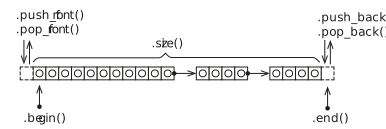
std::deque data structure
std::deque adds some additional methods for adding and removing items at the front and back of the datastructure:
.push_back(…) - Adds an item at the end.
.pop_back(…) - Removes an item from the end.
.push_front(…) - Adds an item at the front.
.push_front(…) - Remove an item at the front.
It is also possible to access the front and back elements using the methods .front() and .back(). Removing elements from the front and back can be done using the .pop_front() and .pop_back(). It is also possible to access element directly as in std::vector using the []-operator and the .as()-method.
An example of how this is used is shown in the following code:
#include <deque>
#include <print>

int main()
{
    std::deque<int> q;

    // Add items to the back

    for (auto i = 0; i < 5; i++)
        q.push_back(i);

    // Add items to the front

    for (auto i = 5; i < 10; i++)
        q.push_front(i);

    // Iterate using iterators

    for (auto it = q.begin(); it != q.end(); it++)
        std::print("{}, ", *it);

    std::print("\n");

    // Iterate using range-based loop

    for (auto &i : q)
        std::print("{}, ", i);

    std::print("\n");

    // Popping and popping

    std::println("q front = {}", q.front());
    std::println("pop front");
    q.pop_front();
    std::println("q front = {}", q.front());
    std::println("q back = {}", q.back());
    std::println("pop back");
    q.pop_back();
    std::println("q back = {}", q.back());
    std::println("q[3] = {}", q[3]);
}
9, 8, 7, 6, 5, 0, 1, 2, 3, 4,

9, 8, 7, 6, 5, 0, 1, 2, 3, 4,
q front = 9
pop front
q front = 8
q back = 4
pop back
q back = 3
q[3] = 5
std::list
std::list is a linearly ordered data structure, implemented as a linked list. The data structure is especially efficient at adding and removing elements in the middle of the sequence. The disadvantage of std::list is that there is no direct access to elements. You will need to iterate through to access all elements. The data structure is well-suited for sorting algorithms. The conceptual data structure is shown in the figure below:
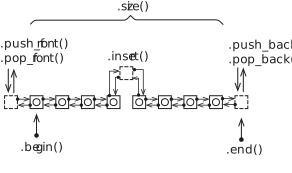
std::list data structure
Just as for the std::deque we have the following methods for adding items to the list:
.push_back(…) - Adds an item at the end.
.pop_back(…) - Removes an item from the end.
.push_front(…) - Adds an item at the front.
.push_front(…) - Remove an item at the front.
However, we don’t have any []-operator or .at() method as this data structure does not allow direct access to its members.
It is possible to add items to the list using the .insert() method. However, this requires an iterator position. We can iterate and insert at a certain position. Insert at the beginning is easy:
l.insert(l.begin(), 42);
Insert at a certain position in this case before the value is 9.
for (auto it = l.begin(); it != l.end(); it++)
{
    if (*it == 9)
        l.insert(it, 43);
}
To remove items in the list we need to use an algorithm or use any of the class methods .erase(), .remove() or .remove_if().
Specific values in a list can be removed using the .remove() method:
l.remove(5); // removes all elements with the value 5
Removing a specific element in the list is again done by iteration. Here we must be careful with the iterator so that we don’t lose track of where to continue iteration. In the following example we delete all values that are equal to 3. We use the .erase() method to remove the iterator from the list, which moves and returns the iterator following the removed item. If the condition is not fulfilled we just move the iterator forward (++it).
for (auto it = l.begin(); it != l.end();)
{
    if (*it == 3)
        it = l.erase(it); // Returns next iterator after erase.
    else
        ++it;
}
Note
Please note that we don’t move the iterator forward in the for-statement to handle the situation when we remove the item from the list using the .erase() method.
A complete example of using the std::list is shown below:
#include <print>
#include <list>

void print_items(const auto &list)
{
    for (auto &v : list)
        std::print("{}, ", v);
    std::println("");
}

int main()
{
    std::list<int> l;

    // Adding items to the list

    for (auto i = 0; i <= 5; i++)
        l.push_back(i);

    for (auto i = 6; i <= 10; i++)
        l.push_front(i);

    l.insert(l.begin(), 42);

    for (auto it = l.begin(); it != l.end(); it++)
    {
        if (*it == 9)
            l.insert(it, 43);
    }

    // List iteration using iterators

    for (auto it = l.begin(); it != l.end(); it++)
        std::print("{}, ", *it);

    std::println("");

    // Range based iteration

    for (auto &v : l)
        std::print("{}, ", v);

    std::println("");

    // Removing items from the front and back

    std::println("l front = {}", l.front());
    std::println("pop front");

    l.pop_front();

    std::println("l front = {}", l.front());
    std::println("l back = {}", l.back());
    std::println("pop back");

    l.pop_back();

    std::println("l back = {}", l.back());

    print_items(l);

    // Removing items using .remove()

    l.remove(0);

    print_items(l);

    // Removing items using .erase()

    for (auto it = l.begin(); it != l.end();)
    {
        if (*it == 3)
            it = l.erase(it); // Returns next iterator after erase.
        else
            ++it;
    }

    print_items(l);
}
42, 10, 43, 9, 8, 7, 6, 0, 1, 2, 3, 4, 5,
42, 10, 43, 9, 8, 7, 6, 0, 1, 2, 3, 4, 5,
l front = 42
pop front
l front = 10
l back = 5
pop back
l back = 4
10, 43, 9, 8, 7, 6, 0, 1, 2, 3, 4,
10, 43, 9, 8, 7, 6, 1, 2, 3, 4,
10, 43, 9, 8, 7, 6, 1, 2, 4,
std::map<Key, T>
In many applications it is desirable to store data associated with a key. The key can for example be a phone number or a name. Using the key it is possible to quickly access the data associated with the key. The std::map data structure stores unique keys with a single value per key.
To declare a std::map datatyep you have to specify 2 data types one for the key and a second one for the value. In the following code we specify a map, m, with a string key and an integer value type.
std::map<std::string, int> m;
Adding values to a map can be done by specifying a key using the []-operator and assigning a new value as shown below:
m["bob"] = 42;
m["alice"] = 40;
m["mike"] = 30;
m["richard"] = 25;
If you assign to an already existing key the value is overwritten. It is also possible to use the .insert() method to insert values into the map:
m.insert({"john", 84});
It is also possible to insert multiple entries using .insert()
m.insert({"caroline", 94}, {"eva", 36});
One of the powerful aspect of a dictionary is the ability to quickly check for the existence of a key in a dictionary. std::map provides a method, .find(), that can query for a key. If a key is found an iterator is returned positioned at the key. If no key was found the method returns .end() iterator of the data structure. An example of this is shown below:
it = m.find("carl");

if (it != m.end())
    std::println("found: {}, {}", it->first, it->second);
else
    std::println("Could not find Carl.");
I the example above you can also see how you access the key and value of an iterator using the ->first and ->second accessors.
In the same way as the other data structures iteration over the elements can be done using iterators. As shown in the following code:
for (auto it = m.begin(); it != m.end(); it++)
    std::println("{}, {}", it->first, it->second);
Using the new modern features of C++ we can also use the range based for-loop to iterate over the std::map. In the following example we use a single loop variable to access the key and values in the data structure.
for (auto &item : m)
    std::println("{}, {}", item.first, item.second);
Please note that now can use the dot-operator to access the first and second fields of the item variable.
It is also possible to assign loop-variables for both the key as well as the value in a range-based loop.
for (auto &[key, value] : m)
    std::println("{}, {}", key, value);
This almost looks line the range-based loop in Python.
Algorithms
Up until now, we have covered some of the data structures available in the C++ standard library. These classes contain methods for moving through the structure in different ways. However, they don’t provide any algorithms for searching or querying the data structures. In C++ there is a distinct separation between data structures and algorithms. This gives you the freedom to use any algorithm on any data structure. Algorithms in C++ are provided through <algorithm> header. The functions in this library can work with any data structure that provides .first and .last attributes.
Lambda functions
Many of the algorithms provided in the standard library require a function to be provided for customising the behavior. To be able to use them you need to implement a function in C++ for each time you need to use the algorithm, which can be a bit complicated. To solve this problem C++ 11 introduced the concept of lambda functions. A lambda function is an anonymous function declaration that can be directly passed to a function call, without having to declare a named function in your source code. The simplified syntax is as follows:
[capture clause] (parameters) -> return type { body }
The capture clause describes how the lambda functions should interact with variables outside the lambda function. By default, no interaction is specified. If an empty capture close is given, the lambda function can’t interact with any variables. If an equal sign [=] is given the lambda function can access all variables by value. If [&] is given all variables are passed by reference to the lambda function. Specific variables can be specified by name or by value using the normal conventions in C++. The parameters section defines the input arguments of a function. This works just like a normal function declaration in C++. The return type is an optional part that can be left out, but it can be specified to make it more explicit what the function returns. The last part of the lambda function is the actual function body that implements the function.
A lambda function can be passed directly to a function or declared directly in the code. In the following example, a lambda function f is declared using the auto directive. The lambda function can then be called just like any other function:
auto f = [](int x) { return x * x; };
std::println("{}", f(5));
The function in this example takes int x as input and returns and int. The function can also be specified with a return type as shown in the following example:
auto f = [](int x) -> int { return x * x; };
std::println("{}", f(5));
In the next example, we declare a function g that has a capture clause [=], which enables the function to access all variables outside the lambda function by value.
int c = 42;

auto g = [=](int x) { return x * x + c; };
std::println("{}", g(5));
Accessing variables by references is achieved similarly in the following example:
int c = 42;

auto h = [&](int x) { return x * x + c; };
std::println("{}", h(5));
If the lambda function should only access specific variables they can be specified in explicetly in the capture clause as in this example:
int c = 42;

auto p = [&c](int x) -> int { return x * x + c; };
std::println("{}", p(5));
Here, the variable c is accessed by reference in the lambda function.
Lambda functions in C++ are a very important concept that we will be using extensively in the following sections on algorithms. They provide a way of quickly providing additional functionality to the algorithms.
Sorting
Sorting is a very common operation on data structures. C++ provides the std::sort() function for sorting. The function takes an iterator for the starting position and an iterator for the end position. By default it sorts in ascending order compared with the less than operator (<), but it is also possible to supply your own comparison function. It is in this scenario where lambda functions provide a quick and easy way of specifying a comparison function.
In the following example, we use the std::sort() function in C++ to sort two arrays, providing our own comparison function as a named lambda function and as an anonymous function directly in the call to std::sort(). The requirement for comparison is a function that takes two input variables and returns true or false depending on the result of the comparison operation. Using this we can create our custom function that determines the sorting order of the algorithm.
#include <algorithm>
#include <print>
#include <vector>

void print_vector(auto v)
{
    for (auto& item : v)
        std::print("{} ", item);
    std::println("");
}

int main()
{
    std::vector v1 = { 6, 4, 7, 3, 9, 0, 1, 5 };
    std::vector v2 = { 6, 4, 7, 3, 9, 0, 1, 5 };

    auto greater_func = [](int a, int b) -> bool { return a > b; };

    std::sort(v1.begin(), v1.end(), greater_func);
    std::sort(v2.begin(), v2.end(), [](int a, int b) -> bool { return a < b; });

    print_vector(v1);
    print_vector(v2);
}
9 7 6 5 4 3 1 0
0 1 3 4 5 6 7 9
Functions with functions as arguments
As with the provided algorithms in C++, it is also possible to implement a function that takes a function as an argument. The classical way of doing this is to declare a function that passes a function pointer.
void tabulate_c(double x_start, double x_end, double dx, double (*f)(double))
In this example f is pointer to a function that takes a double as argument and returns a double value. If we have a declared function:
double q(double x)
{
    return cos(x);
}
We can call the tabulate_c() function as follows:
tabulate_c(-6.0, 6.0, 0.2, q);
It is also possible to pass a lambda-function to this function:
tabulate_c(-6.0, 6.0, 0.2, [](double x) -> double { return sin(x); });
The best way to declare a function argument is to use the std::function declaration. This provides a way to describe any kind of function call in C++ regardless of it being a lambda, function or function object. The previous function can then be declared as follows:
void tabulate(double x_start, double x_end, double dx, std::function<double(double x)> const& f)
A complete example of this can be found in the following example:
#include <algorithm>
#include <print>
#include <functional>
#include <cmath>

void tabulate_c(double x_start, double x_end, double dx, double (*f)(double))
{
    auto x = x_start;

    std::println("x, f(x)");
    std::println("-------------------");

    while (x <= x_end)
    {
        std::println("{}, {}", x, f(x));
        x += dx;
    }
}

void tabulate(double x_start, double x_end, double dx, std::function<double(double x)> const& f)
{
    auto x = x_start;

    std::println("x, f(x)");
    std::println("-------------------");

    while (x <= x_end)
    {
        std::println("{}, {}", x, f(x));
        x += dx;
    }
}

double q(double x)
{
    return cos(x);
}

int main()
{
    tabulate(-6.0, 6.0, 0.2, [](double x) -> double { return sin(x); });
    tabulate(-6.0, 6.0, 0.2, q);

    tabulate_c(-6.0, 6.0, 0.2, [](double x) -> double { return sin(x); });
    tabulate_c(-6.0, 6.0, 0.2, q);
}
9 7 6 5 4 3 1 0
0 1 3 4 5 6 7 9
Query functions
The C++ algorithm library contains many functions for querying data structures. First, the standard library includes several logical functions that return true or false depending on what a query function returns for each element in the structure. The std::all_of() function returns true if the query function returns true for all elements. The query function in this case takes the values as input and returns true if the condition is fulfilled for this value. In the following example the function will return true if all elements are less than 10.
std::vector v = { 6, 4, 7, 3, 9, 0, 1, 5 };

if (std::all_of(v.begin(), v.end(), [](int i) { return i < 10; }))
    std::println("All values of v are less than 10.");
This will display:
All values of v are less than 10.
The next similar function is std::any_of(). This function returns true if any of the values in the data structure returns true in the evaluation function.
std::vector v = { 6, 4, 7, 3, 9, 0, 1, 5 };

if (std::any_of(v.begin(), v.end(), [](int i) { return i % 2 == 0; }))
    std::println("Some of the values are even.");
This will display:
Some of the values are even.
Finally there is the std::none_of() function. This function returns true no of the values return true in the evaluation function.
std::vector v = { 6, 4, 7, 3, 9, 0, 1, 5 };

if (std::none_of(v.begin(), v.end(), [](int i) { return i < 0; }))
    std::println("No numbers are less than zero.");
This will display:
No numbers are less than zero.
There are also function for counting the number of values that fulfill certain criteria, std::count() and std::count_if(). The std::count() counts the values that correspond to the last argument of the function.
auto number_of_values = std::count(v.begin(), v.end(), 5);
std::println("{} items with the value 5 in v2. ", number_of_values);
This will display:
1 items with the value 5 in v2.
The std::count_if() function counts the number of values that return true in the evaluation function.
auto even_numbers = std::count_if(v.begin(), v.end(), [](int i) {return i % 2 == 0; });
std::println("{} even numbers in v2.", even_numbers);
This will display:
3 even numbers in v2.
A complete interactive example is provided below:
#include <algorithm>
#include <print>
#include <vector>
#include <functional>

int main()
{
    std::vector v = { 6, 4, 7, 3, 9, 0, 1, 5 };

    if (std::all_of(v.begin(), v.end(), [](int i) { return i < 10; }))
        std::println("All values of v are less than 10.");

    if (std::any_of(v.begin(), v.end(), [](int i) { return i % 2 == 0; }))
        std::println("Some of the values are even.");

    if (std::none_of(v.begin(), v.end(), [](int i) { return i < 0; }))
        std::println("No numbers are less than zero.");

    if (std::ranges::all_of(v, [](int i) { return i < 10; }))
        std::println("All values of v are less than 10. (ranges)");

    if (std::ranges::any_of(v, [](int i) { return i % 2 == 0; }))
        std::println("Some of the values are even. (ranges)");

    if (std::ranges::none_of(v, [](int i) { return i < 0; }))
        std::println("No numbers are less than zero. (ranges)");

    auto number_of_values = std::count(v.begin(), v.end(), 5);
    std::println("{} items with the value 5 in v2. ", number_of_values);

    number_of_values = std::ranges::count(v, 5);
    std::println("{} items with the value 5 in v2. ", number_of_values);

    auto even_numbers = std::count_if(v.begin(), v.end(), [](int i) {return i % 2 == 0; });
    std::println("{} even numbers in v2.", even_numbers);

    even_numbers = std::ranges::count_if(v, [](int i) {return i % 2 == 0; });
    std::println("{} even numbers in v2 (ranges).", even_numbers);
}
All values of v are less than 10.
Some of the values are even.
No numbers are less than zero.
All values of v are less than 10. (ranges)
Some of the values are even. (ranges)
No numbers are less than zero. (ranges)
1 items with the value 5 in v2.
1 items with the value 5 in v2.
3 even numbers in v2.
3 even numbers in v2 (ranges).
Iterating with for_each
Another useful function when working with data structure is std::for_each(). This function will iterate over the items in the data structure calling a provided function for each item. In the following example a function is called printing out the value of the current item.
std::vector v = { 6, 4, 7, 3, 9, 0, 1, 5 };

std::for_each(v.begin(), v.end(), [](int i) { std::print("{} ", i); });
std::println("");
This will display:
6 4 7 3 9 0 1 5
The provided function is called with the current value as argument. It is also possible to modify the current value by passing the current value by references as shown in the example below:
std::vector v = { 6, 4, 7, 3, 9, 0, 1, 5 };

std::for_each(v.begin(), v.end(), [](int& n) { n++; });
print_vector(v);
This will display:
7 5 8 4 10 1 2 6
Using **std::for_each() it is possible to quickly sum all elements in a vector.
auto sum = 0;

std::for_each(v.begin(), v.end(), [&sum](int n) { sum += n; });
std::println("Them sum is {}", sum);
Note
It is important to make sure that the closure includes the outside variable for the sum by reference (&).
A complete interactive example is provided below:
#include <algorithm>
#include <print>
#include <vector>
#include <functional>


void print_vector(auto v)
{
    for (auto& item : v)
        std::print("{} ", item);
    std::println("");
}

int main()
{
    std::vector v = { 6, 4, 7, 3, 9, 0, 1, 5 };

    std::for_each(v.begin(), v.end(), [](int i) { std::print("{} ", i); });
    std::println("");

    std::ranges::for_each(v, [](int i) { std::print("{} ", i); });
    std::println("");

    std::for_each(v.begin(), v.end(), [](int& n) { n++; });
    print_vector(v);

    std::ranges::for_each(v, [](int& n) { n++; });
    print_vector(v);

    auto sum = 0;

    std::for_each(v.begin(), v.end(), [&sum](int n) { sum += n; });
    std::println("Them sum is {}", sum);

    sum = 0;

    std::ranges::for_each(v, [&sum](int n) { sum += n; });
    std::println("Them sum is {}", sum);

    print_vector(v);

}
6 4 7 3 9 0 1 5
6 4 7 3 9 0 1 5
7 5 8 4 10 1 2 6
8 6 9 5 11 2 3 7
Them sum is 51
Them sum is 51
8 6 9 5 11 2 3 7
Copying
Copying is a very common operation on data structures. The standard library contains many functions for copying data between different data structures. The first one is std::copy() which copies from a data structure given by a starting and end iterator to a target data structure given by the starting iterator. An example of this is shown below:
std::vector v1 = { 6, 4, 7, 3, 9, 0, 1, 5 };
std::vector v2 = { 0, 0, 0, 0, 0, 0, 0, 0 };

std::copy(v1.begin(), v1.end(), v2.begin());

print_vector(v2);
The resulting output will be:
6 4 7 3 9 0 1 5
It is also possible to copy values from one data structure and inserting them at the back or front of the target. To do this we need to use a special function std::back_inserter() as shown in the example below:
std::copy(v1.begin(), v1.end(), std::back_inserter(v2));

print_vector(v2);
which gives the following output:
6 4 7 3 9 0 1 5 6 4 7 3 9 0 1 5
There is a second form of copy function, std::copy_if(), which works like std::copy(), but where it is possible to supply a function that returns true if the function should perform the copy. The function takes the value of the data structure as input. An example of this is shown below:
std::copy_if(v1.begin(), v1.end(), std::back_inserter(v3), [](int v) {return v % 2 == 0; });

print_vector(v3);
Her we can see that std::copy_if() only copied even numbers.
6 4 0
It is also possible to copy values from one data structure to the end of another using the std::copy_backward(). This function takes the start, end iterators of the source data structure and an end-iterator of the data structure to copy from. The function will preserve the order of the values in the source data structure when copying. An example of how to use this function is shown in the following example:
std::vector v1 = { 6, 4, 7, 3, 9, 0, 1, 5 };
std::vector<int> v4(20);

std::copy_backward(v1.begin(), v1.end(), v4.end());

print_vector(v4);
As shown in the output below
0 0 0 0 0 0 0 0 0 0 0 0 6 4 7 3 9 0 1 5
the values of v1 is copied and placed at the end of v4.
A complete interactive example is provided below:
#include <algorithm>
#include <print>
#include <vector>

void print_vector(const auto& v)
{
    for (auto& item : v)
        std::print("{} ", item);
    std::print("\n");
}

int main()
{
	std::vector v1 = { 6, 4, 7, 3, 9, 0, 1, 5 };
    std::vector v2 = { 0, 0, 0, 0, 0, 0, 0, 0 };
    std::vector<int> v3;

    std::copy(v1.begin(), v1.end(), v2.begin());

    print_vector(v2);

    std::copy(v1.begin(), v1.end(), std::back_inserter(v2));

    print_vector(v2);

    std::copy_if(v1.begin(), v1.end(), std::back_inserter(v3), [](int v) {return v % 2 == 0;});

    print_vector(v3);

    std::vector<int> v4(20);

    std::copy_backward(v1.begin(), v1.end(), v4.end());

    print_vector(v4);
}
6 4 7 3 9 0 1 5
6 4 7 3 9 0 1 5 6 4 7 3 9 0 1 5
6 4 0
0 0 0 0 0 0 0 0 0 0 0 0 6 4 7 3 9 0 1 5
Transforming / Replacing
The C++ standard function std::transform() can be used to transform existing values either to a different container or the source container. The function does not guarantee that the operation will be applied in order. If in-order execution is desired the std::for_each() function is a better choice.
std::transform() takes start/end iterator, destination iterator and a modification function as input. Please note that the methods cbegin() and cend() methods must be used to get constant iterators for the 2 first arguments. This is due to the fact that the function is not allowed to modify the input value. In the following code we apply a function to v1 and modify v1 in place.
std::vector v1 = { 6, 4, 7, 3, 9, 0, 1, 5 };

std::transform(v1.cbegin(), v1.cend(), v1.begin(), [](int v){return v*v;});

print_vector(v1);
This will give the following output:
36 16 49 9 81 0 1 25
It is also possible to store the result in a different container:
std::vector<int> v2(8);

std::transform(v1.cbegin(), v1.cend(), v2.begin(), [](int v){return v*v;});

print_vector(v2);
Here we create an empty container, v2, which we will use to store the transformed values, which gives the following result:
1296 256 2401 81 6561 0 1 625
It is of course also possible to insert the items at the end of a container using the std::back_inserter() function as shown below.
std::vector<int> v3;

std::transform(v1.cbegin(), v1.cend(), std::back_inserter(v3), [](int v){return v*v;});
A complete interactive example is provided below:
#include <algorithm>
#include <print>
#include <vector>

void print_vector(auto v)
{
    for (auto& item : v)
        std::print("{} ", item);
    std::println("");
}

int main()
{
	std::vector v1 = { 6, 4, 7, 3, 9, 0, 1, 5 };

    std::transform(v1.cbegin(), v1.cend(), v1.begin(), [](int v){return v*v;});

    print_vector(v1);

    std::vector<int> v2(8);

    std::transform(v1.cbegin(), v1.cend(), v2.begin(), [](int v){return v*v;});

    print_vector(v2);

    std::vector<int> v3;

    std::transform(v1.cbegin(), v1.cend(), std::back_inserter(v3), [](int v){return v*v;});

    print_vector(v3);
}
36 16 49 9 81 0 1 25
1296 256 2401 81 6561 0 1 625
1296 256 2401 81 6561 0 1 625
Removing elements
In previous chapters, we have used the built-in methods in the containers to remove elements within the container. It is also possible to remove elements from containers using the std::remove(), std::remove_if() and std::unique() functions. These functions work in combination with the .erase() methods of the specific container.
The std::remove() method removes specific items that are equal to the argument given in the call. An example of this is shown below:
std::vector v1 = { 6, 4, 7, 3, 9, 0, 1, 5 };

auto removed_item = std::remove(v1.begin(), v1.end(), 9);

if (removed_item != v1.end())
    v1.erase(removed_item, v1.end());

print_vector(v1);
Which gives the following output:
6 4 7 3 0 1 5
When std::remove() removes items by moving them to the end of the container. The returned iterator points to the first element to be erased in the container. This is the reason for giving a starting and an end iterator for the v1.erase() call.
Using the std::remove_if() function it is possible to provide a function for determining if a value in the container should be removed. The function should return true if it should be removed. In the following example, we use a function to remove all even values.
removed_item = std::remove_if(v1.begin(), v1.end(), [](int v)
    { return v % 2 == 0; });

if (removed_item != v1.end())
    v1.erase(removed_item, v1.end());

print_vector(v1);
Running this example with give the following output:
7 3 1 5
Another function that can be useful is the std::unique() function. This functions remove repeated values in a container. Combined with the std::sort() function it is possible to extract the unique values in a container as shown in the next example:
std::vector v2 = { 4, 5, 7, 4, 3, 3, 7, 7, 4, 5 };

auto last = std::unique(v2.begin(), v2.end());
v2.erase(last, v2.end());

std::sort(v2.begin(), v2.end());

last = std::unique(v2.begin(), v2.end());
v2.erase(last, v2.end());

print_vector(v2);
This gives the following output:
3 4 5 7
A complete interactive example is provided below:
#include <algorithm>
#include <print>
#include <vector>

void print_vector(auto v)
{
    for (auto& item : v)
        std::print("{} ", item);
    std::println("");
}

int main()
{
    std::vector v1 = { 6, 4, 7, 3, 9, 0, 1, 5, 9 };

    auto removed_item = std::remove(v1.begin(), v1.end(), 9);

    if (removed_item != v1.end())
        v1.erase(removed_item, v1.end());

    print_vector(v1);

    removed_item = std::remove_if(v1.begin(), v1.end(), [](int v)
        { return v % 2 == 0; });

    if (removed_item != v1.end())
        v1.erase(removed_item, v1.end());

    print_vector(v1);

    std::vector v2 = { 4, 5, 7, 4, 3, 3, 7, 7, 4, 5 };
    // std::vector v2 = { 1, 2, 3, 4, 5 };

    auto last = std::unique(v2.begin(), v2.end());
    v2.erase(last, v2.end());

    std::sort(v2.begin(), v2.end());

    last = std::unique(v2.begin(), v2.end());
    v2.erase(last, v2.end());

    print_vector(v2);
}
6 4 7 3 0 1 5
7 3 1 5
3 4 5 7
Numeric operations
The algorithm library also contains several functions for performing numerical operations. The first function that can be useful is the std::iota() function. This function can generate series of values in a container. It is used by giving a start and end iterator and a starting value as shown in the following example:
std::vector<double> v1(20);

std::iota(v1.begin(), v1.end(), 1.0);

print_vector(v1);
which prints
1 2 3 4 5 6 7 8 9 10 11 12 13 14 15 16 17 18 19 20
Another function that can be useful for computational use is std::accumulate(). This function takes accumulates values from a given starting value with a specified operation, that can be given as a built-in operation or a custom function. If no function is given the total sum of the values will be calculated as shown below:
auto sum = std::accumulate(v1.begin(), v1.end(), 0.0);

std::println("sum = {}", sum);
Which will display the following output
sum = 210
If we instead want to compute the total product we can provide a standard operation as an additional argument
auto prod = std::accumulate(v1.begin(), v1.end(), 1.0, std::multiplies<double>());

std::println("prod = {}", prod);
this prints
prod = 2.4329e+18
A complete interactive example is provided below:
#include <algorithm>
#include <print>
#include <numeric>
#include <vector>

void print_vector(auto v)
{
    for (auto& item : v)
        std::print("{} ", item);
    std::println("");
}

int main()
{
    std::vector<double> v1(20);

    std::iota(v1.begin(), v1.end(), 1.0);

    print_vector(v1);

    auto sum = std::accumulate(v1.begin(), v1.end(), 0.0);

    std::println("sum = {}", sum);

    auto prod = std::accumulate(v1.begin(), v1.end(), 1.0, std::multiplies<double>());

    std::println("prod = {}", prod);
}
1 2 3 4 5 6 7 8 9 10 11 12 13 14 15 16 17 18 19 20
sum = 210
prod = 2.4329e+18
Constrained algorithms
In C++20 new forms of functions were introduced to the algorithms library which enables you to supply your container as an argument to the function without iterators. This enables a more intuitive and easy-to-understand syntax for many of the functions. As an example the following std::for_each() call
std::for_each(v.begin(), v.end(), [](int i) { std::print("{} ", i); });
std::println("");
can be converted to
std::ranges::for_each(v, [](int i) { std::print("{} ", i); });
std::println("");
It is also possible to sort a container by a simple
std::ranges::sort(v);
All these functions are available in the std::ranges namespace.
Links to more information
This chapter only gives an overview of how containers and algorithms in C++ can be used more information on available data structures and algorithms can be found att cppreference.com here: