The C++ Language

This chapter will go through the language elements of C++. We focus on modern C++ (C++11 and beyond) as it provides safer, more expressive features particularly valuable for scientific and engineering applications. For readers coming from Python or Fortran, you’ll find that modern C++ offers similar expressiveness while maintaining the performance advantages of a compiled language.
Example of Modern C++ Code
An example of a simple modern C++ program is shown in the following example.
#include <vector>
#include <print>

int main()
{
    std::vector<int> numbers{0, 1, 2, 3, 4, 5, 6, 7, 8, 9};

    // Range-based for loop (modern C++)
    for (const auto& num : numbers)
        std::println("{}", num);

    std::println("Hello, Modern C++");
    return 0;
}
#include <iostream>
using namespace std;  // Discouraged in modern C++

int main()
{
    for (int i = 0; i < 10; i++)
        std::println("{}", i);

    std::println("Hello, C++");
    return 0;
}
0
1
2
3
4
5
6
7
8
9
Hello, C++
The modern example includes the print header for terminal output and vector for dynamic arrays.
int main() is the C++ main function (entry point) called when the application starts.
std::print() and std::println() is the modern way of printing output to the console. In modern C++, we explicitly use the std:: prefix rather than using namespace std, which can cause name conflicts in larger projects.
The range-based for loop (for (const auto& num : numbers)) is the modern way to iterate over containers - similar to Python’s for num in numbers. This is safer and more readable than index-based loops.
Note
For Python developers: Range-based for loops work like Python’s for-in loops. For Fortran developers: Similar to Fortran’s DO CONCURRENT or array syntax.
Warning
Avoid using namespace std; in modern C++. It can cause naming conflicts and makes code less clear. Always use explicit std:: prefixes.
Variables
Variables are references to data stored in memory and give you a way of referencing the data using a name instead of an address. Care should be given when assigning variable names so that they are self-explanatory.
A naming convention that is often used in C++ is CamelCase. In this convention, names are formed by combining multiple words into single names, capitalizing the first letter of each word. Variables start with a lower case letter. Class names are all upper case. Examples can be:
class EquationSolver; // Classes are nouns. Start with upper case.
double length;        // variables start with lower case.
int totalNumber;      // variable with two words with camel case.
void myFunction();    // Functions and methods lower case CamelCase.
Variable names
The C++ language also defines some rules regarding variable naming. Variables in C++ should consist of:
Letters a-z, A-Z (not Å, Ä, Ö)
Numbers 0-9
Underscore _
First character must be a letter or an underscore.
Lower case letters are not equivalent with upper case letters. Case sensitive language.
The following variable names are correct:
int i, j;
double x, y;
double z0;
bool correct_answer;
The following variable names are not correct:
int 0i;
double å0;
Declaring variables
C++ is a strongly type language and all variables needs to be declared with a type. A variable is declared by specifying the type followed by the variable name as shown in the following example:
int a;
double c;
float x;
In this example, an integer variable a, a double variable c and a float variable x is declared.
Note
Values of declared undefined until they have been initialized.
Variable initialisation
Before a variable is used it should be initialized, that is given a value. Modern C++ provides several initialization methods, but uniform initialization with braces {} is strongly recommended for new code.
Uniform Initialization (Modern C++11+, Recommended)
Uniform initialization uses curly braces and is the safest method because it prevents narrowing conversions (data loss), which is critical in scientific computing:
int i{0};              // Recommended
float x{0.0f};
double pi{3.14159};
int count{};           // Default initialization to 0

// int bad{3.14};      // Compiler error! Prevents data loss
Note
For Python developers: Similar to Python’s type hints catching errors. For Fortran developers: Like Fortran’s strict type checking.
Legacy Initialization Methods
C-style initialization with = (legacy, still widely used):
int i = 0;             // Works, but allows narrowing
float x = 0.0;
int lossy = 3.14;      // Silently truncates to 3! Dangerous!
Constructor-based initialization with () (legacy):
int i(0);              // Can be confused with function declaration
float x(0.0);
Recommendation: Use uniform initialization {} for new code as it:
Prevents accidental narrowing conversions (type safety)
Works consistently for all types (built-in, classes, containers)
Provides clear, explicit initialization syntax
Helps catch bugs at compile-time
You will see different initialization styles in existing code and libraries, but prefer {} in your own scientific and engineering applications.
Variable types
In C++ there are 7 fundamental datatypes that can be used.
Character types - char, char16_t, char32_t, wchar_t
Signed integer types - short, int, long, long long
Unsigned integer type - unsigned short, unsigned int, unsigned long, unsigned long long.
Floating point types - float, double, long double
Boolean type - bool
void type - void
nullptr - decltype(nullptr)
Sizes of variables types depend on platform and compiler. C++ only specifies sizes relative to other types with at least number of bits.
In the following chapters we will cover these datatypes in more details.
C++ Type System - Language Comparison
For readers coming from Python or Fortran, here’s a quick reference:
Concept |
Python |
Fortran |
Modern C++ |
|---|---|---|---|
Integer |
|
|
|
Float (double) |
|
|
|
String |
|
|
|
Dynamic array |
|
|
|
Fixed array |
|
|
|
Note
The auto keyword in C++ provides type inference similar to Python’s dynamic typing, but happens at compile-time for maximum performance.
Integer types
Integer datatypes come in two flavors signed and unsigned. The basic signed integer type is int, which corresponds to signed int. The corresponding unsigned variable type is unsigned int. Unsigned variables always require the prefix unsigned. The available datatypes with increasing size:
signed char / unsigned char
short int / unsigned short int
int / unsigned int
long int / unsigned long
Note
Don’t use unsigned to prevent negative values. This can lead to conversion errors later on.
Unsigned integers can be used to represent bit patterns.
The following code shows how different integer types are delcared and assigned. Please note what happens if you assign a negative value to an unsigned integer.
 1#include <print>
 2
 3int main()
 4{
 5    int a;
 6    unsigned int b;
 7    long int c;
 8    unsigned long int d;
 9
10    a = -1;
11    b = -1; // What happens here?
12    c = -1;
13    d = -1; // and here?
14
15    std::println("a = {}", a);
16    std::println("b = {}", b);
17    std::println("c = {}", c);
18    std::println("d = {}", d);
19}
a = -1
b = 4294967295
c = -1
d = 18446744073709551615
The size of an integer depends on the compiler and platform. C++ just provides relative guarantees between the different datatypes. The actual size of a datatype can be queried using the std::sizeof() function. This function returns the size in multiples of sizeof(char)=1. The relationship between the integer datatypes are:
1 = sizeof(char) ≤ sizeof(short) ≤ sizeof(int) ≤ sizeof(long)
In the code below the std::sizeof() to query the exact size of the datatypes on the current platform.
#include <print>

using std::println;

int main()
{
    int a;
    unsigned int b;
    long int c;
    unsigned long int d;

    a = -1; b = -1;
    c = -1; d = -1;

    println("a = {}, sizeof(a) = {}", a, sizeof(a));
    println("b = {}, sizeof(b) = {}", b, sizeof(b));
    println("c = {}, sizeof(c) = {}", c, sizeof(c));
    println("d = {}, sizeof(d) = {}", d, sizeof(d));
}
a = -1, sizeof(a) = 4
b = 4294967295, sizeof(b) = 4
c = -1, sizeof(c) = 8
d = 18446744073709551615, sizeof(d) = 8
Character types
Character types contain values that correspond to the values from a character set. Character sets are guaranteed to contain numeric characters, 26 letters of the english alphabet and common delimiters. The smallest character type is char, which should be at least 8 bits (0..255). This can vary from different systems. The default type, char, is unsigned. There is also a signed version (-128..127). To support additional character sets there are alos additional character types:
char16_t - at least 16 bits
char32_t - at least 32 bits
wchar_t - supporting the largest character set
It is possible to convert from char to integer using the int() function.
#include <print>

int main()
{
    char c;
    unsigned char uc;
    signed char sc;
    char16_t c16;
    char32_t c32;
    wchar_t w32;

    c = 'a';
    uc = 170;
    sc = 130;

    c16 = 'b';
    c32 = 'c';
    w32 = 'd';

    std::println("c = {} int(c) = {} sizeof(c) = {}", c, int(c), sizeof(c));
    std::println("uc = {} int(uc) = {} sizeof(c) = {}", uc, int(uc), sizeof(c));
    std::println("sc = {} int(sc) = {} sizeof(c) = {}", sc, int(sc), sizeof(c));
    std::println("c16 = {} int(c16) = {} sizeof(c16) = {}", char(c16), int(c16), sizeof(c16));
    std::println("c32 = {} int(c32) = {} sizeof(c32) = {}", char(c32), int(c32), sizeof(c16));
    std::println("w32 = {} int(w32) = {} sizeof(w32) = {}", char(w32), int(w32), sizeof(w32));
}
c = a int(c) = 97 sizeof(c) = 1
uc = ª int(uc) = 170 sizeof(c) = 1
sc = ‚ int(sc) = -126 sizeof(c) = 1
c16 = b int(c16) = 98 sizeof(c16) = 2
c32 = c int(c32) = 99 sizeof(c32) = 2
w32 = d int(w32) = 100 sizeof(w32) = 2
Note
cout does not support unicode characters or char16_t or char32_t, which requires us to use the wcout operator instead and make a conversion to wchar_t instead.
Floating point types
Floating point datatypes are the essential buildingblocks of compuational codes. C++ support 3 floating point types:
float - single precision
double - double precision. Higher precision than float.
long double - extended precision. Higher precision that double.
If your computational relies on precision use double. The actual size of the types is compiler dependent. Usually the long double can be inefficient as this datatype is often not implemented in the processor architecture and the compiler will have to generate special CPU code for working with this datatype.
#include <print>
#include <cmath>

int main()
{
	double pi = 4 * std::atan(1);

    float f;
    double d;
    long double ld;

    f = pi;
    d = pi;
    ld = pi;

    std::println("f = {:.15}", f);
    std::println("d = {:.15}", d);
    std::println("ld = {:.15}", ld);
}
f = 3.14159274101257
d = 3.14159265358979
ld = 3.14159265358979
Floating point literals
When assigning values to variables in C++ in can sometimes be required/benficial to specify the datatype of the scalar value specified in the source code (floating point literal). This can be done using suffixes on the value in the code. If no suffix is given on a value the datatype is assumed to be double. The following example illustrates the use of suffixes when specifying floating point literals:
float a = 1.0f;       // 1.0f is float
double b = 1.0;       // 1.0 is assumed to be double
long double c = 1.0l; // 1.0l is long double
It is also possible to use literals with suffixes for literals in scientific notation:
float d = 1e300f;          // float
double e = 1e-300;         // double
long double f = 42.0e-40l; // long double
Numerical limits
To query the capabilites of datatypes, C++ provides functions for this in the include file. Using the functions in this module it is possible to query max and min ranges for any standard data types. To query the largest value of a datatype use the std::numeric_limits<[datatype]>::max() function. In the same way query the lowest value using the std::numeric_limits<[datatype]>::min() function. It is also possible to check if a datatype is signed using the std::numeric_limits<[datatype]>::is_signed flag. The follwing example show how the functions are used:
#include <print>
#include <limits>

int main()
{
    std::println("Max, char {}", int(std::numeric_limits<char>::max()));
    std::println("Min, char {}", int(std::numeric_limits<char>::min()));
    std::println("Is char signed {}", std::numeric_limits<char>::is_signed);
    std::println("Max, unsigned char {}", int(std::numeric_limits<unsigned char>::max()));
    std::println("Min, unsigned char {}", int(std::numeric_limits<unsigned char>::min()));
    std::println("Max, short {}", std::numeric_limits<short>::max());
    std::println("Min, short {}", std::numeric_limits<short>::min());
    std::println("Max, int {}", std::numeric_limits<int>::max());
    std::println("Min, int {}", std::numeric_limits<int>::min());
    std::println("Max, long {}", std::numeric_limits<long>::max());
    std::println("Min, long {}", std::numeric_limits<long>::min());
    std::println("Max, float {}", std::numeric_limits<float>::max());
    std::println("Min, float {}", std::numeric_limits<float>::min());
    std::println("Max, double {}", std::numeric_limits<double>::max());
    std::println("Min, double {}", std::numeric_limits<double>::min());
    std::println("Max, long double {}", std::numeric_limits<long double>::max());
    std::println("Min, long double {}", std::numeric_limits<long double>::min());
}
Max, char 127
Min, char -128
Is char signed 1
Max, unsigned char 255
Min, unsigned char 0
Max, short 32767
Min, short -32768
Max, int 2147483647
Min, int -2147483648
Max, long 9223372036854775807
Min, long -9223372036854775808
Max, float 3.40282e+38
Min, float 1.17549e-38
Max, double 1.79769e+308
Min, double 2.22507e-308
Max, long double 1.18973e+4932
Min, long double 3.3621e-4932
Enumeration types
Another important datatype in C++ is the enumeration type. Enumerations are similar to integers, but only have a limited set of predefined constants that can be assigned to an enumeration variable. Enumeration constant can also map to integer values. Which integer value that is mapped to a constant is determined by the order in which the constants are defined. It is also possible to assign specific values to the constants if that is desired. Enumerations can also be defined as distinct datatypes. If used in integer expressions they are converted to integers.
A simple enumeration is shown in the following example:
enum { Low, Medium, High };

int level = Medium;
We can also define an enumeration as a datatype in a similar way:
enum Level { Low, Medium, High };

Level level = Medium;
As said before enum constants can be assigned specific integer values as well:
enum Level { Low = -1, Medium = 0, High = 1 };

Level level = Medium;
A more complete example of how to use enums is shown below:
#include <print>

int main()
{
    enum { Red, Green, Blue, Yellow };

    std::println("RED = {}", static_cast<int>(Red));
    std::println("GREEN = {}", static_cast<int>(Green));
    std::println("BLUE = {}", static_cast<int>(Blue));
    std::println("YELLOW = {}", static_cast<int>(Yellow));

    int simple_color = Green;

    std::println("simple_color = {}", simple_color);

    enum flavor { Vanilla, Chocolate, Orange, Strawberry };

    flavor selectedFlavor = Orange;

    std::println("selectedFlavor = {}", static_cast<int>(selectedFlavor));

    enum status { Finished = 0, Error = 15 };

    status currentStatus = Error;

    std::println("currentStatus = {}", static_cast<int>(currentStatus));
}
RED = 0
GREEN = 1
BLUE = 2
YELLOW = 3
selectedFlavor = 2
currentStatus = 15
Class enumerations
The standard enum type in C++ can be error-prone due to its direct mapping to integers. In C++ 11 the enum class was introduced to solve these problems. Enum class names are local to the enum and can’t be converted implicitly to other datatypes. Also, a name in a standard enum can’t be reused in the same scope.
A class enum is declared with the enum class keyword. The name must also be specified using the enum class name as a prefix, as shown below:
enum class Fruit = { Banana, Orange, Apple };

Fruit selectedFruit = Fruit::Banana;
A complete example is shown below.
#include <print>

int main()
{
    enum class Color
    {
        Grey,
        Cyan,
        Purple
    };

    Color color = Color::Cyan;

    if (color == Color::Cyan)
        std::println("Color is Cyan");
    else
        std::println("Color is not Cyan");
}
Color is Cyan
Arrays and Containers
In scientific and engineering applications, arrays are fundamental data structures. Modern C++ provides safe, efficient container types that are superior to C-style arrays.
Modern C++ Containers (Recommended)
For dynamic arrays, use std::vector (similar to Python lists or Fortran ALLOCATABLE arrays):
#include <vector>

std::vector<int> data{0, 1, 2, 3, 4};     // Initialize with values
std::vector<double> values(100);          // 100 elements, default-initialized
std::vector<double> zeros(100, 0.0);      // 100 elements, all zeros

// Access elements (with bounds checking in debug mode)
data[0] = 42;                              // Array notation
data.at(1) = 21;                          // Bounds-checked access

// Dynamic sizing
data.push_back(5);                        // Append element
int size = data.size();                   // Get size
data.resize(200);                         // Resize array
Note
For Python developers: std::vector is like Python’s list - dynamic,
resizable, and handles memory automatically.
For Fortran developers: Similar to ALLOCATABLE arrays with automatic memory management.
For fixed-size arrays, use std::array (safer than C arrays):
#include <array>

std::array<int, 10> fixedData{};          // 10 integers, zero-initialized
std::array<double, 3> coords{1.0, 2.0, 3.0};

int arraySize = fixedData.size();         // Size available at runtime
Note
std::array provides the performance of C arrays with safety features: bounds checking (in debug), size tracking, and compatibility with standard algorithms.
Legacy C-Style Arrays (Avoid in New Code)
C-style arrays are still supported for compatibility but should be avoided in new code due to lack of bounds checking and error-prone syntax:
int oldStyle[10];                         // C-style array (not recommended)
oldStyle[0] = 42;                         // No bounds checking
// sizeof(oldStyle) gives bytes, not element count
// Cannot be easily passed to functions
// Easy to cause buffer overflows
C Strings
As C++ is a superset of C it supports the creation of C based strings. A C string is very similar to an array and is declared in the same way:
char name[size]
Size is the number of characters the string can have. It is important that strings in C are terminated with a null character #0 or “n”. You should always declare a string length with one more the required length.
Intialising C strings can be done either directly at creation or using an assignment later in the code.
The easiest assignment is when declaring the variable:
char myString[] = "This is my string.";
Just like arrays we don’t have to specify the size if the variable is initialised directly. When initialising like this an null character is automatically added. It is also possible to declare a string with a specified length.
char myString[50] = "This is my string.";
Here storage space for 50 characters is allocated and initialised with a predefined string. This string can now be reassigned strings up to 50 characters.
For international support there are also additional character types available in the standard such as char16_t, char32_t and wchar_t which has been mentioned before.
We will not go too deep into C strings as C++ has a built-in string type, std::string, which is much easier and safer to use.
Constants
Constants can be seen as read-only variables that can’t be changed during program execution. Can be used to replace numeric constants in the source code, making code more easily updatable by placing these values in a single place.
Constants can also be used to precompute expressions at compile time, preventing it to be calculated at run-time, to save computations.
A constant is declared with the const keyword with the following syntax:
const [datatype] name = value
An example of this can be:
const int v = 42;
This declares a constant v with the value 42.
In later versions of C++ the notion of constants have been expanded, so that the compiler can execute functions and generate code at compile time using the constexpr-keyword.
A complete example of how to use constants is given below:
#include <iostream>

using namespace std;

const int max_size = 4;

int main()
{
    int a[max_size];

    for (int i=0; i<max_size; i++)
        a[i] = 0;
}
Structured data types
In many application it can be beneficial to combine several datatypes into a custom data type. In C++ this can be achieved using the struct datatype. In a struct a set of fields of different datatypes can be combined into a structured datatype. I it similar to a records in a database. In the followin code a number of fields are combined into an Employee struct.
struct Employee {
    char[15] firstName;
    char[15] lastName;
    char[30] address;
}
The defined Employee struct can now be declared and used like any other datatype in C++. A svea Employee variable is declared
Employee svea;
To assign values to the inner records dot-notation can be used.
svea.firstName = "Svea";
svea.lastName = "Svensson";
svea.address = "Unknown";
It is also possible to create arrays of structs.
Employee employees[10];
Access to the individual records is done using the following code:
employee[0].firstName = "Fredrik";
If the Employee variable is dynamically allocated individual records needs to be accessed using the -> operator.
svea->firstName = "Dynamo";
#include <print>

int main()
{
    struct coord3D {
        double x{};
        double y{};
    };

    coord3D c1;
    coord3D c2;

    c1.x = 0.0;
    c1.y = 0.0;
    c2.x = 1.0;
    c2.y = 1.0;

    std::println("c1.x = {}, c1.y = {}", c1.x, c1.y);
    std::println("c2.x = {}, c2.y = {}", c2.x, c2.y);
    std::println("sizeof(c1) = {}", sizeof(c1));
}
c1.x = 0, c1.y = 0
c2.x = 1, c2.y = 1
sizeof(c1) = 16
Type deduction and the auto keyword
In C++ all variables must be declared with a type, which can lead to long declarations and make the code unreadable. In many cases, the compiler can automatically deduce which data type should be used. In those cases, we can use the auto keyword to tell the compiler to figure out the data type for us automatically. Consider the following example:
int a = 42;
A string literal in C++ (a constant value in the source code) is represented by the data type it fits, starting with int followed by long int and long long int. In the above example fits in a int variable and is stored as an int the compiled code. If we are not interested in the actual data type we can let the compiler decide the statement above then becomes:
auto a = 42;
We can validate using the include in the standard library using the following code.
std::println("{}", typeid(a).name());
This will print out
i
i is GCC:s type name for an int. Other variable declarations can also be deduced by the string literal assigned to the auto declared variable.
auto b = 42l;   // type suffix for a long data type
auto c = 42.0;  // no suffix denotes a double
auto d = 42.0f; // f suffix denotes a float

std::println("{}", typeid(b).name());
std::println("{}", typeid(c).name());
std::println("{}", typeid(d).name());
Which gives the following output:
l
d
f
The complete example is given below:
#include <print>
#include <typeinfo>

int main()
{
    auto a = 42;    // By default int
    auto b = 42l;   // suffix defines a long
    auto c = 42.0;  // By default a double
    auto d = 42.0f; // suffix denotes a float

    std::println("{}", typeid(a).name());
    std::println("{}", typeid(b).name());
    std::println("{}", typeid(c).name());
    std::println("{}", typeid(d).name());
}
i
l
d
f
A good use of the auto keyword is to use it as the data type for loop variables. The compiler will then automatically select the correct data type depending on the size of the loop range. An auto declared loop is shown in the following example:
#include <print>
#include <typeinfo>

int main()
{
    for (auto i=99999999; i<100000000; i++)
        std::println("{}, {}", i, typeid(i).name());
}
99999999, i
Increase the range of the loop in the example and see how the datatype changes.
The auto keyword becomes more interesting when working with data structures and algorithm by reducing the complexity of the required declarations.
Type Aliases (using)
For scientific and engineering code, type aliases improve readability and maintainability by giving meaningful names to types:
// Define common types for your domain
using Real = double;              // Precision type for calculations
using Index = std::size_t;        // Array indexing type
using Vector = std::vector<Real>; // 1D array
using Matrix = std::vector<Vector>; // 2D array (row-major)

// Use in code
Vector velocities(1000);
Matrix stiffnessMatrix(100, Vector(100));

Real temperature{273.15};
Index numNodes{1000};
Note
For Fortran developers: Similar to defining custom types or using PARAMETER for type kinds.
For Python developers: Like type aliases in type hints:
Vector = List[float]
Benefits:
Easy to change precision (Real = float vs double vs long double)
Self-documenting code (Vector vs std::vector<double>)
Consistent types across codebase
Simpler refactoring
// Legacy typedef (still valid but using is preferred)
typedef std::vector<double> Vector;  // Old style

// Modern using (recommended)
using Vector = std::vector<double>;  // New style, clearer
Strings
Modern C++ provides std::string, a powerful and safe string type that should be used instead of C-style character arrays. For scientists and engineers, std::string offers:
Automatic memory management (no manual allocation/deallocation)
Dynamic sizing (grows as needed)
Rich set of operations (search, replace, substring, etc.)
Safety (bounds checking in debug mode)
Interoperability with C libraries when needed
Note
For Python developers: std::string works similarly to Python strings
with automatic memory management and rich operations.
For Fortran developers: More flexible than CHARACTER variables - no fixed length declarations needed.
To use the C++ string type we need to add the following include:
#include <string>
A std::string is declared just like any normal C++ datatype.
std::string s1 = "My first string.";
std::string s2{"My second string."};
A more complete example is given below:
#include <print>
#include <string>

int main()
{
    std::string s = "hello";
    std::println("a = '{}'", s);
}
a = 'hello'
Note
std::string is the real variable type as it is part of the :std namespace.
String operations
The benefits of using std::string is how you can use it with standard C++ operators to create new strings.
std::string s1 = "C++";
std::string s2 = "is";
std::string s3 = "fun";
std::string fun = s1 + " " + s2 + " " + s3;
In the above example 3 strings are combined together to a new string, fun, which is automatically resized to the size of all strings and spaces.
The length of a string can be queried using the .length() method.
std::println("{}", fun.lentgth()); // Prints the string length
Individual string characters can be accessed using the bracket operator or using the .at() method.
std::println("{}", fun[0]);    // Prints first character
std::println("{}", fun.at(1))"; // Prints second character
The following example illustrates more string operations.
#include <print>
#include <string>

int main()
{
    std::string s1 = "hello";
    std::string s2 = ", world";
    std::string s3 = s1 + s2;
    std::println("s3 = '{}'", s3);
    std::println("s3.length() = {}", s3.length());
    std::println("s3[7] = {}", s3[7]);
    std::println("s3.at(7) = {}", s3.at(7));
}
s3 = 'hello, world'
s3.length() = 12
s3[7] = w
s3.at(7) = w
C++ String methods
std::string is an class that has many methods for interacting with the string. The .length() method was mentioned in previous sections, but there are many more methods available. The .append(string)-method appends a string to an existing string. Corresponds to the + operator. It is also possible to use .replace(pos, n, string)-method to replace n characters at position pos with string. The .insert(pos, string)-method inserts string at position pos in the string. Finally the .substr(pos, n)-method extract n characters from position pos.
In the following example these methods are illustrated.
#include <print>
#include <string>

int main()
{
    std::string s1 = "hello";
    std::string s2 = ", world";
    std::string s3 = s1 + s2;

    s3.append(". Strings in C++ are great!");
    std::println("s3 = {}", s3);

    s3.replace(33, 6, "nice! ");
    std::println("s3 = {}", s3);

    s3.insert(33, "great and ");
    std::println("s3 = {}", s3);

    std::string s4 = s3.substr(33, 6);
    std::println("s4 = {}", s4);

}
s3 = hello, world. Strings in C++ are great!
s3 = hello, world. Strings in C++ are nice!
s3 = hello, world. Strings in C++ are great and nice!
s4 = great
Searching C++ strings
A very common tasks when using string is searching for specific characters or substrings in a string. In std::string the .find()-method can be used for this purpose. The first version of this method .find(string) finds the first occurrence of string and returns the position in the string. In the second version of this method .find(string, startpos) the search is performed from the startpos position and the next occurrence is returned. If string is not found the method returns std::string::npos. The use of this method is shown in the following example:
#include <print>
#include <string>

int main()
{
    std::string s = "The quick brown fox jumps over the lazy dog.";

    auto p0 = s.find("o");
    auto p1 = s.find("o", p0+1);
    auto p2 = s.find("xx");

    std::println("The first 'o' is at position {}", p0);
    std::println("The next 'o' is at position {}", p1);

    if (p2 == std::string::npos)
        std::println("xx was not found.");
    else
        std::println("xx was found.");
}
The first 'o' is at position 12
The next 'o' is at position 17
Compatibility with C strings (char*)
In many cases, it is required to interface with existing C code or call APIs that require a C-based string (char*). A std::string is not directly compatible with a C-string, but can be easily interfaced with them. A std::string can be assigned a C-string directly as shown in the following example:
char cstr[] = "This is a C-string";
std::string s = cstr;
The opposite is not directly possible. However, std::string provides a special method, .c_str(), that return a C-string (char*) that can be used to copy it to a C-string or given to a call to a function that requires it. In the following example we create a C++ string which we copy to a C-string using the strcpy() function which is available in the ``#include <cstring>`` header.
string s = "This is a C++ string.";
char cstr[255] = "";
strcpy(cstr, s.c_str());
A more complete example of the use of .c_str() is given below:
#include <print>
#include <cstring>
#include <string>

int main()
{
    const char* cString;
    char cString2[128];

    std::string cppString = "Hello, world!";

    cString = cppString.c_str();

    std::println("cString = {}", cString);
#ifndef WIN32
    strncpy(cString2, cppString.c_str(), cppString.length()+1);
#else
    strncpy_s(cString2, cppString.c_str(), cppString.length()+1);
#endif
    std::println("cString2 = {}", cString2);
}
cString = Hello, world!
cString2 = Hello, world!
!!! note
Allow for an extra position for the #0 character in the `strncpy` call.
!!! note
`strncpy` is a overflow safe version of the C `strcpy` function.
Expressions and operators
In C++ expressions can be created using the many available operators. For the basic data types in C++ the operators work just like in any other language. Operators can also be used with other datatypes, however, the operations can be quite different from those defined for the basic data types. The order of precedence is as follows:
Increment operators a++, a–
Increment operators ++a, –a
Unary sign operators +a, -a
Multiplication a * b
Division a / b
Modulus a % b
Addition a + b
Subtraction a - b
Arithmetic operators
The arithmetic operators are defined in the following table in order of precedence:
Operator |
Description |
|---|---|
(+/-)x |
Unary sign operator |
* |
Multiplication |
/ |
Division |
% |
Modulo |
Addition |
|
Subtraction |
Relational operators
Relational operators are used to compare different variables or values. They return either true or false. They are typically used in if-statements or similar, which are described in the following sections.
Operator |
Meaning |
Python |
|---|---|---|
< |
less than |
< |
< |
less than or equal |
<= |
== |
equal |
== |
!= |
not equal |
!= |
>= |
greater than or equal |
>= |
Logical operators
Logical operators are used for logical comparisons of boolean expressions. The operators take either true or false as input and return either true* or false. They are also typically used in if-statements or similar, which are described in the following sections.
Operator |
Meaning |
Python |
|---|---|---|
&& |
and |
and |
|| |
or |
or |
! |
not |
not |
Compound assignment operators
Compound assignment operators simplify some operations to reduce the complexity of an expression as well as increase efficiency.
Operator |
Description |
Equivalent to |
|---|---|---|
+= |
a += b |
a = a + b |
-= |
a -= b |
a = a - b |
/= |
a /= b |
a = a / b |
*= |
a *= b |
a = a * b |
%= |
a %= b |
a = a % b |
The following code shows the usage of a compound assignment operator.
#include <print>

int main()
{
    int a, b;

    a = 42;
    b = 26;

    a += b; // a = a + b

    std::println("a = {}", a);
}
a = 68
Increment and decrement operators (++/–)
A common operation on basic data types is to increment or decrement a variable by 1. C++ defines special increment (++) and decrement (–) operators for this purpoose. The operators exist in 2 versions, a prefix (++a/–a) and a postfix (a++/a–) version. The difference is that the prefix version will return the updated value when evaluated in an expression. The postfix version will return the existing value when evaluated in an expression.
In the following example, b, will be assigned the value of a after it has been updated by the increment operator, giving it the value of 43. c will be assigned the value of a before it is updated by the increment operator, giving it the value of 43. The final value of a will be 44.
#include <print>

int main()
{
    int a, b, c;

    a = 42;

    b = ++a;
    c = a++;

    std::println("b = {}", b);
    std::println("c = {}", c);
}
b = 43
c = 43
Conditional operator ?
There is also a special operator that can return different values depending on a given condition. The syntax is as follows:
condition ? result_if_true : result_if_false
If condition is true the result of the expression will be result_if_true otherwise result_if_false.
!!! warning
This operator should be used with caution as it can lead to code that is difficult to read.
The following example shows how the operator can be used. The user is asked for a number, number. The outValue variable is assigned 42 if number is greater than or equal to 50 otherwise it is assigned 21.
#include <iostream>
#include <print>

int main()
{
    int number;

    std::print("Enter a number : ");

    std::cin >> number;

    int outValue = (number>50) ? 42 : 21;

    std::println("outValue = {}", outValue);
}
Enter a number : 45
outValue = 21

Enter a number : 55
outValue = 42
Expressions
To illustrate the precedence rules the following example
-a + b + c1
is evaluated from left to right as.
((-a) + b) + c
The expression
-a + b * c
is evaluates from left to right as
(-a) + (b * c)
Note
If uncertain it is never wrong to add a parenthesis.
Note
If functions are used in expressions they are evaluated before any other operators.
Mixed-mode expressions
If expressions are constructed with operands of many different datatypes, weaker datatypes are coerced to the stronger one. Results will be of the stronger type. This is illustrated in the following example where the i integer variable is coerced to double.
double a;
int i;
double b;

b = a * i // i is coerced to double_types1
Statements and code structure
Code in C++ consists of statements that form the code of an application or a library. There are two types of statements in C++, normal statements separated by semicolons (;) and compound statements grouped with curly brackets { }. The below code consists of normal statements:
int a = 42;    // statement 1
int b = 21;    // statement 2
int c = a + b; // statement 3
Compound statements or code blocks are mostly used in function/class definitions, conditional expressions and iteration structures. All variables declared in a compound statement will be automatically removed when execution exits the statement. The following code illustrates this:
int main()
{
   int a = 0; // normal statement

   // compound statement

   {
      int b = 1;
      int c = 2;
   }

   int d = b;     // Error, b is not available here

   return 0;
}
Standalone compound statements can be used to force the automatic cleanup of variables and dereference shared pointers, which is described later in this book. However, their main use is to define the structure of your application by defining functions and logical statements of the application.
In the following sections, we will go through the basic building blocks that define the behavior of your code.
Control structures
Control structures are constructs that control the flow of your application. It can be constructs for iterating code, taking different routes depending on the state of variables (branching) or defining reusable parts of code (functions).
iteration
One of the more important control structures is for repeating some code several times or until a specific condition is met (iteration). There are 3 major iteration statements in C++
while – Condition before iteration statements
do – Condition after iteration statements
for – Compact version of the while-statement
All iterations statements are controlled using the same methods. The break-statement can be used to exit an iteration statement. The continue-statement can be used to continue to the next iteration. A return-statement will also exit a loop, but also a function. The exit()-statement will also terminal a loop and the entire application.
The following example uses a for-statement to illustrate the use of break and continue to control the flow in an iteration statement.
 1#include <print>
 2
 3int main()
 4{
 5      for (auto i=0; i<20; i++)
 6      {
 7         if (i==6)
 8            continue;
 9
10         if (i==10)
11            break;
12
13         std::println("{}", i);
14      }
15}
0
1
2
3
4
5
7
8
9
In line 10 the iteration will continue and no output will be printed. In line 13 the iteration will stop and the for-loop exited.
Try it yourself below:
while-statement
The while-statement iterates a statement until a certain expression is false. In the folowing code we defined the variable counter, which we initalise to 0. We will use counter in the expression in the while-statement. In the example we will loop until counter is less than or equal to 10. In the code block for the while-statement the value of the counter is printed and increased by 1.
#include <print>

int main()
{
    int counter = 1;

    while (counter <= 10)
    {
        std::println("counter = {}", counter);
        counter = counter + 1;
    }
}
counter = 1
counter = 2
counter = 3
counter = 4
counter = 5
counter = 7
counter = 8
counter = 9
counter = 10
Note
In a while-statement it is our responsibility to make sure any variables used in the expression are initialised. If not the code can get stuck in an endless iteration. The same situation can happen if the variables in the expression are not updated in the code block for the while-statement.
do-statement
In the while-statement the statements in the code block are not executed if the expression evaluated to false. If the statements should be executed at least once, the do-statement can be used instead. In this construct the conditional expression is evaluated after the the first iteration.
#include <print>

int main()
{
    int counter = 1;

    do
    {
        std::println("counter = {}", counter);
        counter = counter + 1;
    }
    while (counter<=10);
}
counter = 1
counter = 2
counter = 3
counter = 4
counter = 5
counter = 7
counter = 8
counter = 9
counter = 10
In this example counter is initalised and the first iteration of the do-statement is entered regardless of the value of the counter variable. If counter would have been set to 20, the value would still have been printed in the first iteration.
for-statement
Range-Based For Loop (Modern C++11+, Recommended)
The range-based for loop is the modern, preferred way to iterate over containers and arrays. It’s safer and more readable than index-based loops:
std::vector<int> data{1, 2, 3, 4, 5};

// Modern range-based for loop (recommended)
for (const auto& value : data)
{
    std::println("{}", value);
}

// For modifying elements
for (auto& value : data)
{
    value *= 2;    // Double each element
}
Note
For Python developers: for value in data becomes for (auto value : data)
For Fortran developers: Similar to DO i = 1, SIZE(array) but automatic
Benefits of range-based for loops:
No off-by-one errors
Clearer intent (“for each item”)
Works with any container (vector, array, list, etc.)
Compiler optimizations often make it faster
Traditional Index-Based For Loop (When Needed)
Use traditional for loops when you need the index or specific control:
// When you need indices
for (size_t i = 0; i < data.size(); i++) {
    std::println("Element {}: {}", i, data[i]);
}

// Custom step or reverse iteration
for (int i = 10; i > 0; i--) {
    std::println("{}", i);
}
To create a shorter version of the do/while-statements which also can initialise and update a loop variable we can use the for-statement instead. The syntax of this statement is as follows:
- > for([start statements]; [conditional expression]; [step statements])
statements
The start expression is executed before the iteration. conditional expression is evaluated to determine if the iteration should continue. step statements is executed after each iteration. A typical for-statement is shown below:
for (int i=0; i<10; i++)
      std::println("{}", i);
In this loop i is initialised to 0 before the iteration. The iteration continues if i is less than 10. On every iteration i is incremented by 1.
If we want to iterate starting from one we can use the following for-statement instead:
for (int i=1; i<=10; i++)
    std::println("{}", i);
Using the for-statement makes it unnessecary to declare a special loop variable outside the iteration statement and creates a single statement containing initalisation, conditional expression and loop variable update.
Note
The loop variable declared in the for-statement is not available outside the code block of the loop.
Note
Use auto in range-based for loops: for (const auto& item : container)
lets the compiler deduce the type, making code more maintainable and preventing
type mismatches.
The parameters in the for-statement are not required. If give an empty parameters we get an endless loop as in the following example:
for (;;)
{
    // endless loop
}
An example of using a for-statement to update the counter as in the previous examples is shown
#include <print>

int main()
{
    for (auto counter = 1; counter<=10; counter++)
        std::println("counter = {}", counter);
}
counter = 1
counter = 2
counter = 3
counter = 4
counter = 5
counter = 7
counter = 8
counter = 9
counter = 10
In the following example, we use the iteration update step to calculate a sum.
#include <print>

int main()
{
    auto sum = 0;

    for (auto i=0; i<=10000; sum += ++i);

    std::println("sum = {}", sum);
}
sum = 50015001
Conditional statements
There are 2 main conditional statements in C++, the if-statement and the switch-statement. The if-statement takes single or multiple conditions as input and executes the code block if the conditions evaluate to true. It is also possible to add a code block that is executed when the condition is false. This is done by adding an else-section to the if-statement.
The switch-statement is used to select multiple paths depending on the condition.
if-statement
The if-statement in its simplest form has the following syntax:
if (condition) statement
or
if (condition)
    statement
else
    statement
if condition returns true statement is executed. An example of this is shown below:
if (answer==42) std::println("The answer was 42.");
It is also possible to use else to execute statements if the condition is false as in the following example:
if (answer==42)
    std::println("The answer was 42.");
else
    std::println("The answer was not 42.");
Note
No semicolon (;) is required after else as this belongs to the if-statement.
If more statements are required to be executed a code block can be added to the if-statement as shown in the following example:
if (answer>42)
{
    std::println("The answer was greater than 42.");
    std::println("This requires a more thorough explanation.");
}
else
{
    std::println("The answer could have been 42. You never know?");
}
Multiple conditions can be combined using relational and logical operators. It is important to use parenthesis to separate the relational and logical operations. In the following example we use an if-statement to determine if x is inside a certain interval.
if ((x>=-1.0)&&(x<1.0))
    std::println("x is in the interval -1.0 <= x < 1.0");
In the following example, we use an if-statement to output when the loop counter, i, is 5.
#include <print>

int main()
{
    for (int i=1; i<=10; i++)
    {
        std::println("i = {}", i);

        if (i==5)
            std::println("i == 5");
    }
}
i = 1
i = 2
i = 3
i = 4
i = 5
i == 5
i = 6
i = 7
i = 8
i = 9
i = 10
In this example, the else statement is used.
#include <iostream>
#include <print>

int main()
{
    for (int i=1; i<=10; i++)
    {
        if (i==5)
            std::println("i == 5");
        else
            std::println("i != 5");
    }
}
i != 5
i != 5
i != 5
i != 5
i != 5
i == 5
i != 5
i != 5
i != 5
i != 5
i != 5
In this example, we use a nested for-statement.
#include <print>

int main()
{
    for (int i=1; i<=10; i++)
    {
        std::print("i = {}: ", i);

        if (i==5)
            std::println("i == 5");
        else if ( (i>=2)&&(i<=3) )
            std::println("2 <= i <= 3");
        else
            std::println("-");
    }
}
i = 1: -
i = 2: 2 <= i <= 3
i = 3: 2 <= i <= 3
i = 4: -
i = 5: i == 5
i = 6: -
i = 7: -
i = 8: -
i = 9: -
i = 10: -
switch-statement
A switch-statement is suitable when a lot of options needs to be evaluated from a single expression. The syntax is:
switch (condition)
{
    case expression:
        statement

    default:
        statement
}
If the condition evaluates to one of the case expressions, code jumps to this case expression. Execution then continues through the following case expressions. If conditions does not evaluate to any of the case expressions execution continues after the switch-statement or executes the code in the default label. The following code shows an example of this:
switch (state)
{
    case 0:
        std::println("state = 0");
    case 1:
        std::println("state = 1");
    default:
        std::println("state is not 0 or 1");
}
If state is 0 output will be:
state = 0
state = 1
state is not 0 or 1
if state is 1 code execution jumps to the case 1: label and the output will be:
state = 1
state is not 0 or 1
If state is not any of the case expressions the default section will be executed producing the output:
state is not 0 or 1
If we only want one of the case expressions to be evaluated for a given state we have to add a break after each case expression as in the following code:
switch (state)
{
    case 0:
        std::println("state = 0");
        break;
    case 1:
        std::println("state = 1");
        break;
    default:
        std::println("state is not 0 or 1");
        break;
}
The break statement will exit the switch-statement. The above code with state set to 0 will produce the following output:
state = 0
switch-statements are very suitable when comparing enumerations as the following example illustrates:
#include <print>
#include <cstdlib>
#include <ctime>

int main()
{
    enum colorType { RED, GREEN, BLUE, YELLOW, ORANGE };
    srand((unsigned)time(0));


    for (int i=0; i<4; i++)
    {
        colorType color = colorType(rand()%5);
        switch (color)
        {
            case RED:
                std::println("Color is red.");
                break;
            case GREEN:
                std::println("Color is green.");
                break;
            default:
                std::println("Color is either BLUE, YELLOW or ORANGE.");
                break;
        }
    }
}
Color is green.
Color is either BLUE, YELLOW or ORANGE.
Color is either BLUE, YELLOW or ORANGE.
Color is red.
Functions
Functions are the main building blocks of your code. A function is a named block of code performing a certain task of your application. A function can have input arguments and optionally also return a value. The simplified syntax of a function is:
[return type] [name]([arguments])
{
    statements
}
If the function does not return anything the void data type must be given. Arguments to the function are also optional. No arguments are indicated with an empty parenthesis. A very simple funtion with no return value and no arguments then becomes:
void simple_func()
{
    std::println("This function just prints this message...");
}
The return value is returned using the return-statement as shown in this function:
int meaning_of_life()
{
    return 42;
}
Calling a function that doesn’t return a value is done by simply giving the name of the function and its argument (empty for the above functions) list:
simple_func()
To call a function that returns a value we must declare a variable to receive the returned value:
int meaning{0};

meaning = meaning_of_life();
Alternatively we can declare and assign the value in a single statement:
int meaning = meaning_of_life();
Variables declared in the function code block are local to the function and are not available outside the function.
The following example shows how a function is declared and called from a main program.
#include <print>

void simple()
{
    std::println("Hello, from function!");
}

int main()
{
    simple();
}
Hello, from function!
Function arguments
The function arguments are a way of giving input as well as receiving output from a function. By default all values to a function are passed by value, that is the value of an argument is copied over to the function. Passing by value also means that the input argument can’t change anything in the code calling the function.
Function arguments are declared in the parenthesis of the function using the datatype of the argument and the name of the argument. Multiple arguments can be specified separating them with commas. Below is a simple function with a single integer argument:
void myfunc(int a)
{
    std::println("{}", a);
}
The function just prints out the value of a. It is possible to use the argument as a variable in the function code block.
void myfunc(int a)
{
    std::println("{}", a);
    a = 42;
    std::println("{}", a);
}
As the argument a is passed by value the assignment of a in the function will not affect the any variables in the code calling the function. A complete example of a function with an argument called from a main program is shown below:
#include <print>

void simple(int a)
{
    std::println("The value of a = {}", a);
}

int main()
{
    simple(42);
}
The value of a = 42
In the following example, this behavior is illustrated by printing the address of the variables in the main program as well as in the function using the reference operator (&).
#include <iostream>
#include <print>

void simple(int a)
{
    std::println("The value of a = {}", a);
    std::println("&a = {}", static_cast<void*>(&a));
}

int main()
{
    int a = 42;
    simple(a);

    std::println("&a = {}", static_cast<void*>(&a));
}
The value of a = 42
&a = 0x7fff5fbff69c
&a = 0x7fff5fbff6bc
Passing output arguments
In most functions we are also interested in getting data out from the function. This can be done in a couple of ways. One way is to pass a pointer over to the function. The pointer itself is passed by value, but the pointer itself points to the address of the variable that should receive the value. The assign a value to the incoming argument we need to dereference the pointer. In the following function we declare an integer pointer for the outgoing argument that we want the function to modify we use the star operator to dereference the pointer, so that we can assign the value of the variable passed in to the function:
void simple(int* a)
{
    std::println("The value of a = {}", (void*)a);
    std::println("*a = {}", *a);
    *a = 43;
}
In the main program we declare the variable we want to pass to the function. We can’t pass this variable directly to the function as the function requires a pointer as input. To solve this we use the reference operator (&) to pass the address of a to the function:
int main()
{
    int a = 42;
    simple(&a);
    std::println("The value of a = {}", a);
}
Passing pointer gives us the ability to pass a variable into a function and let the function modify it’s value. The complete example is shown below:
#include <print>

void simple(int* a)
{
    std::println("The value of a = {}", static_cast<void*>(a));
    std::println("*a = {}", *a);
}

int main()
{
    int a = 42;
    simple(&a);
}
The value of a = 0x7fff5fbff6bc
*a = 42
The syntax for scalar values using pointers is a bit clumsy to use. However, there is a better way using reference operators in the argument list. To do this we declare the arguments that will be modified by the function using the reference operator. The previous function then becomes:
void simple(int& a)
{
    std::println("The value of a = {}", a);
    a = 43;
}
Using the reference operator in the declaration the variable can be used without a star operator just like any other variable. Assigning a value in the function will also change the variable in the code calling the function.
int main()
{
    int a = 42;
    simple(a);
    std::println("The value of a = {}", a);
}
Running the above code will print out 43 as the function has assigned 43 to the reference variable a in the function.
#include <iostream>
#include <print>

void simple(int* a)
{
    *a = 43;
}

int main()
{
    int a = 42;

    std::println("Before function call: a = {}", a);
    simple(&a);
    std::println("After function call : a = {}", a);
}
Before function call: a = 42
After function call : a = 43
Passing arrays
Because there is a duality between pointer and arrays, it is possible to pass arrays using pointers or using the index operator. A function with an array as input can be defined as
void print_array(char* a)
{
    for (int i=0; i<4; i++)
        std::print("{}, ", a[i]);
    std::println("");
}
or
void print_array(char a[])
{
    for (int i=0; i<4; i++)
        std::print("{}, ", a[i]);
    std::println("");
}
The following example shows a complete example with both methods.
#include <print>

void print_array_1(int* a)
{
    for (int i=0; i<4; i++)
        std::print("{}, ", a[i]);
    std::println("");
}

void print_array_2(int a[])
{
    for (int i=0; i<4; i++)
        std::print("{}, ", a[i]);
    std::println("");
}

int main()
{
    int a[] = { 1, 2, 3, 4 };
    print_array_1(a);
    print_array_2(a);
}
1, 2, 3, 4,
It is also possible to modify the array in the function as shown below.
#include <iostream>
#include <print>

void simple(int* a)
{
    a[3] = 42;
}

int main()
{
    int a[] = { 1, 2, 3, 4 };
    simple(a);
    std::println("a[3] = {}", a[3]);
}
1, 2, 3, 4,
Preventing accidental modification of arguments (const)
Passing by reference and pointers also means that they can be modified in the functions. If this is not desired it is possible to use the const modifier to tell the compiler that the function arguments are not allowed to be modified in the function. We still get the benefits of directly being able to access the incoming argument. In the following declaration we pass a float variable by reference, but prefix it with the const modifier. Trying to modify the variable in the function will give a compiler error.
float add(const float& a, const float& b)
{
    // a = 42; // Uncomment this line will generate a compiler error.
    return a + b;
}
Try this yourself in the following example:
Using const for basic types in C++ is not really required. It makes more sense when more complicated data types are used such as string, vectors and other classes. In the following example we pass 2 strings by reference to a function using the const modifier. This prevents them to be modified in the function. It is also more efficient to pass strings by reference as the string does not have to be copied.
void log_output(const std::string& context, const std::string& message)
{
    std::println("{}: {}", context, message);
}
Try this yourself in the following example:
const can also be used with arrays to prevent them to be accidentally modified in a function:
void print_array(const int* a)
{
    for (int i=0; i<4; i++)
        std::print("{}, ", a[i]);
    std::println("");
}
This is the array example from previous sections using the const modifier.
Note
Consider declaring as many input arguments as possible using the const modifier. This prevents accidental modification of arguments as well as give important hints to the compiler so it can generate more efficient code.
Structured Bindings (C++17)
Structured bindings allow unpacking multiple return values elegantly, useful for functions returning multiple results (common in scientific computing):
#include <algorithm>
#include <vector>

std::vector<double> data{3.1, 1.4, 5.9, 2.6};

// Get min and max in one call
auto [minIt, maxIt] = std::minmax_element(data.begin(), data.end());
std::println("Min: {}, Max: {}", *minIt, *maxIt);
Returning multiple values from functions:
#include <tuple>

// Function returns multiple values
std::tuple<double, double, double> computeStats(const std::vector<double>& data) {
    auto [minIt, maxIt] = std::minmax_element(data.begin(), data.end());
    double mean = std::accumulate(data.begin(), data.end(), 0.0) / data.size();
    return {*minIt, *maxIt, mean};
}

// Unpack results
auto [min, max, mean] = computeStats(data);
std::println("Min: {}, Max: {}, Mean: {}", min, max, mean);
Note
For Python developers: Similar to tuple unpacking:
min_val, max_val, mean = compute_stats(data)
For Fortran developers: Like multiple return values through INTENT(OUT) parameters but more concise.
Handling Missing Data (std::optional)
std::optional (C++17) provides a type-safe way to represent values that may or may not exist - useful for error handling in numerical computations:
#include <optional>
#include <cmath>

// Function that might not return a valid result
std::optional<double> safeSqrt(double x) {
    if (x < 0.0) {
        return std::nullopt;  // No valid result
    }
    return std::sqrt(x);
}

// Use the result
auto result = safeSqrt(-4.0);
if (result.has_value()) {
    std::println("Result: {}", result.value());
} else {
    std::println("No valid result (negative input)");
}

// Or use value_or for default
double value = safeSqrt(-4.0).value_or(0.0);  // Returns 0.0 if no value
Division by zero handling:
std::optional<double> safeDivide(double numerator, double denominator) {
    if (std::abs(denominator) < 1e-10) {  // Too close to zero
        return std::nullopt;
    }
    return numerator / denominator;
}

auto result = safeDivide(10.0, 0.0);
if (result) {  // Implicit conversion to bool
    std::println("Result: {}", *result);  // Dereference like pointer
}
Note
For Python developers: Similar to returning None for invalid results,
but type-safe at compile time.
For Fortran developers: Like using special values (NaN) or status flags, but safer and more explicit.
Pointers and references
Pointers are variables that store memory references to locations in memory. Pointer in C++ can be both typed and untyped. A pointer variable is declared with a star operator (*). The syntax for a pointer declaration is:
[datatype]* name;
The following code shows a typical pointer declaration:
int* a;
a is pointer to a memory location containing an integer.
To get a pointer to a non-pointer variable the & operator can be used. In the following example we assigne the memory location of b to the pointer variable a.
int* a;
int b;

a = &b; // a now points to the memory location of b
If we want to get the value of the memory location the pointer variable references we can use the star (*) operator dereference the pointer.
int* a;
int b = 42;

a = &b;

std::println("{}", *a); // Dereferencing pointer a,
                    // Displaying the value a points to
In this example the value of a is printed, which actually is value of b.
In C++ we can also declare an untyped pointer using the void datatype. This pointer can be assigned any typed pointer. However assigning a non-typed pointer to a typed pointer requires a type cast.
int* a;
int b = 42;
void* c;

a = &b;
c = a;  // OK assigning a typed pointer to a non-typed.

a = static_cast<int*>(c); // Assigning a non-typed pointer to
                          // an typed pointer requires a cast.
#include <print>

int main()
{
    int a{42};
    int* b;
    void* c;

    b = &a; // Assigning the address of a to pointer b
    c = b;  // Assigning the pointer b to the non-typed pointer c

    // To assign a non-typed pointer to a typed pointer we need
    // to cast the c pointer to an int* pointer

    b = static_cast<int*>(c);

    std::println("a = {}", a);
    std::println("b = {}", static_cast<void*>(b));
    std::println("&a = {}", static_cast<void*>(&a));
    std::println("*b = {}", *b);
    std::println("c = {}", c);
}
a = 42
b = 0x291bfffb4c
&a = 0x291bfffb4c
*b = 42
c = 0x291bfffb4c
The following figures illustrate how pointers are assigned in the previous code example:
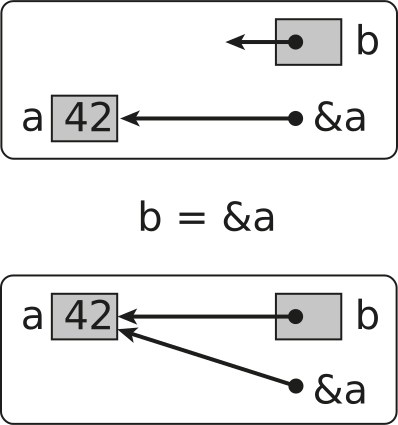
Assigning pointer b with the & operator
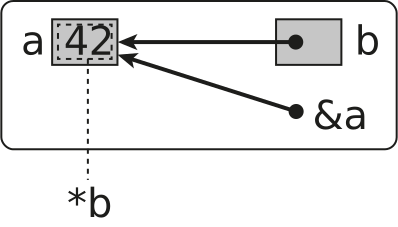
*b is the value stored at memory location b
Array pointer duality
Arrays and pointers are very closely related in C++. Pointer types can be accessed using array notation and arrays can be accessed with pointers. This enables both flexibility as well as increasing the risk for errors. The concept is best illustrated with an example.
First we declare an array a with some values.
int a[] = {0, 1, 2, 3};
Next we declare a pointer variable b.
int* b;
An array variable can be directly assigned to a pointer variable of the same datatype like this:
b = a;
The pointer variable b now points to the first element of the a array. If we print out these variables we get:
std::println("a = {}", (void*)a);
std::println("b = {}", (void*)b);
a = 0x7fff5fbff6a0
b = 0x7fff5fbff6a0
Both the array a and the pointer variable b point to the same address. Also, a when printing does not print the array but the memory address. This is the C++ array/pointer duality.
Both a and b can accessed using array notation. Printing a[0] and b[0] should give the same values.
std::println("a[0] = {}", a[0]);
std::println("b[0] = {}", b[0]);
a[0] = 0
b[0] = 0
So array and pointer declarations are equivalent except that an is allocated a memory location for the provided values.
It is also possible to get a pointer to a specific element of an array using a combination of the & operator and array notation.
int* c;

c = &a[2];
c now stores a pointer to the third value of the a array. We can also use some pointer arithmetic to do the same thing by using the + operator on a pointer variable.
int* d;

d = b + 2;
d now points to a location 2 integers from the memory location of b. c and b points to the same locations.
c = &a[2];

std::println("c = {}", (void*)c);
std::println("*c = {}", *c);

d = b + 2;

std::println("d = {}", (void*)d);
std::println("*d = {}", *d);
c = 0x156bdff8a8
*c = 2
d = 0x156bdff8a8
*d = 2
Pointer variables can be modified using the ++, –, + and - operators. Increments are done in multiples of the size of the actual datatype.
Note
It is important to make sure that the location a pointer variable references is a valid memory location. Dereferencing a memory location that has not been allocated memory often leads to crashes and undefined behavior.
Below is the complete example in this section.
#include <print>

int main()
{
    int a[] = {0, 1, 2, 3};
    int* b;
    int* c;
    int* d;

    b = a;

    std::println("a = {}", static_cast<void*>(a));
    std::println("b = {}", static_cast<void*>(b));
    std::println("a[0] = {}", a[0]);
    std::println("b[0] = {}", b[0]);
    std::println("*b = {}", *b);
    std::println("*a = {}", *a);

    c = &a[2];

    std::println("c = {}", static_cast<void*>(c));
    std::println("*c = {}", *c);

    d = b + 2;

    std::println("d = {}", static_cast<void*>(d));
    std::println("*d = {}", *d);
}
a = 0x7fff5fbff6a0
b = 0x7fff5fbff6a0
a[0] = 0
b[0] = 0
*b = 0
*a = 0
c = 0x7fff5fbff6a8
*c = 2
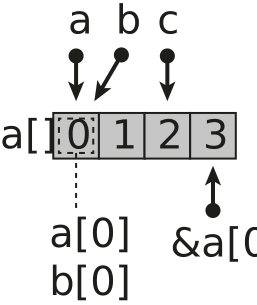
Pointer operations in the previous example is illustrated in the following figure.
References
References are alternative names for variables of the same data type. It is mainly used for return parameters in functions, but can also be used as variables. A reference variable defined by using the & operator after the datatype declaration. The syntax is:
[data type]& name
A reference variable must be initialised and can’t be declared without an initialisation. The following code shows an example of how a reference variable can be declared.
int a = 42;
int& b = a;
In this code b is a reference to a and can be used just like the a variable.
We will look more on this when declaring functions.
A complete example on how references are used is shown below:
#include <print>

int main()
{
    int a = 42;
    int& b = a;

    std::println("a = {}", a);
    std::println("b = {}", b);
    std::println("&a = {}", static_cast<void*>(&a));
    std::println("&b = {}", static_cast<void*>(&b));
}
a = 42
b = 42
&a = 0x7fff5fbff6bc
&b = 0x7fff5fbff6bc
Memory management
Memory in C++ can be allocated in two ways: stack-based (automatic, for local variables with fixed size) and heap-based (dynamic, for runtime-determined sizes).
This section teaches modern C++ first (smart pointers and containers with automatic memory management), followed by legacy manual memory management techniques for understanding existing code.
Note
Quick guidance:
For dynamic arrays → use
std::vectorFor single objects with unique ownership → use
std::unique_ptrFor shared ownership → use
std::shared_ptrAvoid manual new/delete in modern code
Stack and Heap Memory
To understand why modern C++ memory management tools are so valuable, it’s important to understand the two types of memory allocation:
Stack Memory (Automatic)
Stack-based memory allocation is automatic and is used for all local variables defined in functions and code blocks. When a variable goes out of scope (execution leaves the code block), the memory is automatically freed.
void function() {
    int x = 42;              // Allocated on stack
    double arr[100];         // Fixed-size array on stack
    // Memory automatically freed when function returns
}
Key characteristics:
Automatic allocation and deallocation (LIFO - Last In, First Out)
Very fast (just moving a stack pointer)
Size must be known at compile time
Limited in size (typically a few MB)
No memory leaks possible
Heap Memory (Dynamic)
The heap is managed by the operating system and allows runtime-determined sizes. Allocating on the heap requires an OS call and returns a memory address that you must manage.
Key characteristics:
Size can be determined at runtime
Much larger available space (limited by system memory)
Slower than stack allocation (requires OS interaction)
Must be explicitly freed (risk of memory leaks with manual management)
Allows data to outlive the function that created it
Why This Matters for Modern C++
In legacy C++, heap allocation required manual new/delete, making it error-prone. Modern C++ provides automatic heap memory management through:
std::vector - dynamic arrays with automatic cleanup
std::unique_ptr - single-owner heap objects with automatic cleanup
std::shared_ptr - shared heap objects with reference counting
These tools give you heap memory’s flexibility with stack memory’s safety!
Note
For Python developers: Python always uses heap allocation with garbage collection. C++ smart pointers provide similar automatic cleanup but with deterministic timing (immediate when out of scope, not delayed).
For Fortran developers: Like ALLOCATABLE arrays, but cleanup is automatic - no need for DEALLOCATE statements.
Smart Pointers for Heap Allocation
Modern C++ (C++11 and later) provides smart pointers that automatically manage heap memory, preventing memory leaks and dangling pointers. This is the recommended approach for dynamic memory in scientific and engineering applications.
std::unique_ptr - Unique Ownership
Use std::unique_ptr when an object has a single owner:
#include <memory>
#include <vector>

// Dynamic array
std::unique_ptr<double[]> array = std::make_unique<double[]>(1000);
array[0] = 1.0;

// Memory automatically freed
Note
For Python developers: Like Python’s automatic garbage collection, but happens immediately when the object goes out of scope.
For Fortran developers: Similar to DEALLOCATE but automatic - no need to manually free memory.
std::shared_ptr - Shared Ownership
Use std::shared_ptr when multiple parts of code need to access the same data:
#include <memory>

std::shared_ptr<<double[]> data = std::make_shared<double[]>(1000)

auto alias = data;  // Both point to same data

// Memory freed when last shared_ptr is destroyed
std::vector - Best Choice for Dynamic Arrays
For most cases, std::vector is superior to manual allocation:
std::vector<double> data(1000000);     // 1M elements
data.resize(2000000);                   // Grow as needed

// Automatic memory management, bounds checking, size tracking
Warning
Avoid manual new/delete in modern C++. Use:
std::vectorfor dynamic arraysstd::unique_ptrfor single objects with unique ownershipstd::shared_ptrfor shared ownershipstd::make_uniqueandstd::make_sharedfor safe allocation
Multi-dimensional Arrays
Multidimensional arrays is an important data structure for numerical computing. This section demonstrate how to implement this using the standard data structures in C++. If you are going to do more serious array computing please see the chapter on the Eigen library.
In the following table some approaches for implementing multidimensional arrays using the standard library.
Modern Approaches for 2D Arrays
#include <vector>

const int rows = 4;
const int cols = 8;

// Create 2D array
std::vector<std::vector<int>> array(rows, std::vector<int>(cols, 0));

// Access elements
array[1][1] = 42;

// Iterate
for (auto& row : array) {
    for (auto& elem : row) {
        std::print("{}, ", elem);
    }
    std::println("");
}

// Automatic cleanup - no delete needed!
#include <vector>

const int rows = 4;
const int cols = 8;

// Single contiguous memory block (cache-friendly)
std::vector<int> array(rows * cols, 0);

// Access using row-major indexing
array[1 * cols + 1] = 42;  // array[1][1]

// Helper lambda for cleaner access
auto at = [&](int i, int j) -> int& {
    return array[i * cols + j];
};

at(1, 1) = 42;  // Much clearer!

// Iterate
for (int i = 0; i < rows; i++) {
    for (int j = 0; j < cols; j++) {
        std::print("{}, ", at(i, j));
    }
    std::println("");
}
#include <memory>

const int rows = 4;
const int cols = 8;

// Array of unique_ptrs for each row
auto array = std::make_unique<std::unique_ptr<int[]>[]>(rows);
for (int i = 0; i < rows; i++) {
    array[i] = std::make_unique<int[]>(cols);
    for (int j = 0; j < cols; j++)
        array[i][j] = 0;
}

// Access
array[1][1] = 42;

// Automatic cleanup - no manual delete needed!
Note
Performance comparison:
Flattened std::vector: Best cache locality, fastest for computation
vector of vectors: Easy to use, slight overhead per row
unique_ptr approach: For C API compatibility, automatic cleanup
For scientific computing, flattened vector is usually best.
Matrix Class Wrapper (Recommended for Repeated Use)
The following code shows how a simple matrix class can be implemented using a modern approach and using the standard library. However, consider using a matrix library such as Eigen or Armadillo for more serious array computing.
class Matrix {
    std::vector<int> data;
    int rows_, cols_;
public:
    Matrix(int rows, int cols, int initValue = 0)
        : data(rows * cols, initValue), rows_(rows), cols_(cols) {}

    int& operator()(int i, int j) { return data[i * cols_ + j]; }
    const int& operator()(int i, int j) const { return data[i * cols_ + j]; }

    int rows() const { return rows_; }
    int cols() const { return cols_; }

    void fill(int value) { std::fill(data.begin(), data.end(), value); }
};

// Usage
Matrix array(4, 8, 0);  // 4x8 matrix, initialized to 0
array(1, 1) = 42;       // Access element
array.fill(0);          // Reset all to zero
// Automatic cleanup!
Dynamic Arrays of Structures
Modern Approach with std::vector (Recommended)
struct coord3D {
    double x;
    double y;
    double z;
};

// Modern: std::vector of structs
std::vector<coord3D> coords(10);  // 10 coordinates

// Initialize
double counter = 0.0;
for (auto& coord : coords) {
    coord.x = counter++;
    coord.y = counter++;
    coord.z = counter++;
}

// Print
for (const auto& coord : coords) {
    std::println("{}, {}, {}", coord.x, coord.y, coord.z);
}

// Automatic cleanup - no delete needed!
// Also: coords.size() gives you the size
// coords.push_back({x, y, z}) to add more
Note
Benefits of std::vector<coord3D>:
No manual memory management
Knows its size:
coords.size()Can grow dynamically:
coords.push_back({1.0, 2.0, 3.0})Range-based for loops work perfectly
Exception-safe
Alternative: std::unique_ptr (When Raw Pointer Needed)
// If you need a raw array for C API compatibility
auto coords = std::make_unique<coord3D[]>(10);

double counter = 0.0;
for (int i = 0; i < 10; i++) {
    coords[i].x = counter++;
    coords[i].y = counter++;
    coords[i].z = counter++;
}

// Automatic cleanup - no delete[] needed!
Standard Library Algorithms - Preview
Modern C++ provides a rich set of algorithms in the <algorithm> and <numeric> headers that are essential for scientific and engineering applications. These algorithms work seamlessly with containers like std::vector and are often more efficient and safer than manual loops.
For Python developers: These are similar to Python’s list comprehensions,
map(), filter(), and NumPy operations.
For Fortran developers: Similar to array operations and intrinsic functions
like SUM, MAXVAL, MINVAL, but work with any container.
Quick Preview
#include <algorithm>
#include <numeric>
#include <vector>

std::vector<double> data{3.1, 1.4, 2.7, 5.9, 2.6};

// Sort in ascending order
std::sort(data.begin(), data.end());

// Find min and max
auto [minIt, maxIt] = std::minmax_element(data.begin(), data.end());

// Sum all elements
double sum = std::accumulate(data.begin(), data.end(), 0.0);

// Transform: square each element
std::transform(data.begin(), data.end(), data.begin(),
               [](double x) { return x * x; });
Language Comparison
// Python: total = sum(data)
// Fortran: total = SUM(data)
// C++:
double total = std::accumulate(data.begin(), data.end(), 0.0);
// Python: max_val = max(data)
// Fortran: max_val = MAXVAL(data)
// C++:
auto maxIt = std::max_element(data.begin(), data.end());
double max_val = *maxIt;
Note
For comprehensive coverage of C++ algorithms including sorting, searching, transformations, reductions, parallel algorithms, and much more, see the Data Structures and Algorithms chapter.
The standard library provides dozens of optimized algorithms suitable for scientific computing applications.
Legacy Memory Management (For Reference Only)
Danger
The following sections describe manual memory management with new/delete.
These techniques are NOT RECOMMENDED for modern C++ code. They are included here only for:
Understanding legacy C++ codebases
Maintaining existing code that uses manual memory management
Learning how memory management works under the hood
For new code, always use the modern approaches described above.
Note
Stack vs heap memory fundamentals are covered in the modern section above. The following sections demonstrate the low-level mechanics of manual heap allocation that modern C++ abstracts away.
Manual new/delete Operators
In C++, manual heap allocation uses the new operator. The new operator has the following syntax:
new type initialiser
new returns a pointer to the allocated type. In the following example we allocate a single floating point value.
float* pvalue = nullptr;
pvalue = new float;
To access and assign a value to the newly created memory we need to dereference the pointer.
*pvalue = 42.0f;
std::println("{}", *pvalue);
When we are done using the allocated memory we need to release it again to the operating system. If we don’t release the memory we have created a memory leak in our program and if memory is allocated continuously during the lifetime of your application the application will at some point have consumed all memory in your computer, which can lead to crashes and your computer slowing down. To release memory allocated on the heap the delete operator is used. The syntax is:
delete pointer-variable;
To delete our previously allocated memory the code becomes.
delete pvalue;
The allocated memory has now been release back to the operating system. Modern C++ smart pointers (shown in the modern section above) handle this deallocation automatically.
Manual Array Allocation with new[]
Warning
Modern C++ Recommendation: Use std::vector for most cases, or std::unique_ptr for raw arrays when interfacing with legacy APIs. Avoid manual new[] and delete[].
Allocating basic scalar types in C++ is overkill. The real benefits of heap memory allocation is to allocate large arrays of different datatypes. C++ has special versions of the new and delete functions for allocating arrays.
To allocate an array in C++ we add a bracket with the size of the array when we allocate memory for the array.
float* arr = nullptr;

arr = new float[100];
or in a single statement.
float* arr = new float[100];
As pointers can be used using array notation by default an array created with new can doesn’t have to be dereferenced as with the basic types.
for (int i=0; i<100; i++)
    arr[i] = 0.0f;
When the array is no longer needed it has to be released with delete. However, we need to use a special version of delete on arrays, delete [].
delete [] arr;
Legacy 2D Arrays - Array of Pointers Approach
Warning
Modern C++ Recommendation: Use std::vector<std::vector<T>> (simple) or a flattened std::vector<T> with index calculation (high performance). The following manual pointer-based approaches are for legacy code understanding only.
C++ has no direct support for dynamically allocated two-dimensional arrays. However, we can create arrays of pointers to arrays to simulate this kind of an array. The idea is to create an array of pointers for each row in the array. These pointers will point to arrays with size of the number of columns of the array. First we declare our main array, which will contain rows pointers of int. These pointers we will allocated in the inner loop
const int rows = 4;
const int cols = 8;

int** array = new int*[rows];
Next we loop over the main array, allocating an array for each row with the size cols.
for (auto i=0; i<rows; i++)
{
    array[i] = new int[cols];

    for (auto j=0; j<cols; j++)
        array[i][j] = 0;
}
We now have an allocated two-dimensional array, which we can used like any other array in C++. Assigning the second row and second column can be done like this:
array[1][1] = 42;
To delete the allocated memory for this array we first need to delete the memory for our rows and finally delete the outer array of pointers.
// Deleting row arrays

for (auto i=0; i<rows; i++)
    delete [] array[i];

// Delete main array.

delete [] array;
The best way of handling the creation and destruction of these arrays is to create one function for creating the array and another one for destroying the array, see following sections.
A complete example of this is shown below:
#include <iostream>
#include <print>

const int rows = 4;
const int cols = 8;

int main()
{
    int** array = new int*[rows];

    int counter = 0;

    for (auto i=0; i<rows; i++)
    {
        array[i] = new int[cols];

        for (auto j=0; j<cols; j++)
            array[i][j] = counter++;
    }

    for (auto i=0; i<rows; i++)
    {
        for (auto j=0; j<cols; j++)
            std::print("{}, ", array[i][j]);

        std::println("");
    }

    // Deleting row arrays

    for (auto i=0; i<rows; i++)
        delete [] array[i];

    // Delete main array.

    delete [] array;
}
0, 1, 2, 3, 4, 5, 6, 7,
8, 9, 10, 11, 12, 13, 14, 15,
16, 17, 18, 19, 20, 21, 22, 23,
24, 25, 26, 27, 28, 29, 30, 31,
Legacy 2D Arrays - Fortran-Style Contiguous Allocation
Note
Modern Alternative: The flattened std::vector shown in the modern section above is the modern equivalent of this Fortran-style approach, with automatic memory management and better safety.
The method using an array of pointers is not a very efficient data structure in computational codes as it creates as it allocates many smaller memory blocks. To solve this we can use the same approach as in Fortran and allocate a single memory block and access it like a two-dimensional array with some tricks.
First we create the same array of pointer as in the previous example.
int** array = new int*[rows];
We then allocate a single array that contains all elements of the array and assign the first pointer in array.
array[0] = new int[rows*cols];
To be able to access the array just like any other array we need to assign pointers to different positions in the array where the different rows start.
for (int i=0; i<rows; i++) { array[i] = &array[0][i*cols];
   for (int j=0; j<cols; j++)
      array[i][j] = counter++;
Note
The trick is on line 5. Here we retrieve the address (&) where each row starts and assign it to the correct row of the pointer array. Destroying the array is done almost in the same way except we don’t have to loop over the outer array.
delete [] array[0];
delete [] array;
A complete example is available below:
#include <print>

const int rows = 4;
const int cols = 8;

int main()
{
    int** array = new int*[rows];
    array[0] = new int[rows*cols];

    int counter = 0;

    for (int i=0; i<rows; i++)
    {
        array[i] = &array[0][i*cols];

        for (int j=0; j<cols; j++)
            array[i][j] = counter++;
    }

    for (int i=0; i<rows; i++)
    {
        for (int j=0; j<cols; j++)
            std::print("{}, ", array[i][j]);

        std::println("");
    }

    delete [] array[0];
    delete [] array;
}
0, 1, 2, 3, 4, 5, 6, 7,
8, 9, 10, 11, 12, 13, 14, 15,
16, 17, 18, 19, 20, 21, 22, 23,
24, 25, 26, 27, 28, 29, 30, 31,
Legacy Helper Functions for 2D Arrays
Note
Modern C++ Alternative: Instead of manual functions with raw pointers, use a simple wrapper class with std::vector for automatic memory management:
class Matrix {
    std::vector<int> data;
    int rows_, cols_;
public:
    Matrix(int rows, int cols, int initValue = 0)
        : data(rows * cols, initValue), rows_(rows), cols_(cols) {}

    int& operator()(int i, int j) { return data[i * cols_ + j]; }
    const int& operator()(int i, int j) const { return data[i * cols_ + j]; }

    int rows() const { return rows_; }
    int cols() const { return cols_; }

    void fill(int value) { std::fill(data.begin(), data.end(), value); }
};

// Usage
Matrix array(4, 8, 0);  // 4x8 matrix, initialized to 0
array(1, 1) = 42;       // Access element
array.fill(0);          // Reset all to zero
// Automatic cleanup!
To make it easier to used two-dimensional arrays in C++ we will implement three functions for this purpose:
A function for creating an array of a given size.
A function for initialising the array with a given value.
A function for destroying the allocated array.
The function for creating an array will need to have an output argument for the allocated array (int**) and input argument for the number of rows and columns. We use the reference operator (&) for passing the allocated pointer out from the function. The finished function becomes:
void createArray(int** &array, int rows, int cols)
{
    array = new int*[rows];
    array[0] = new int[rows*cols];

    for (auto i=0; i<rows; i++)
        array[i] = &array[0][i*cols];
}
The function does not initialise the values of the array. An example of this is shown in the following function:
void zeroArray(int** &array, int rows, int cols)
{
    for (auto i=0; i<rows; i++)
        for (auto j=0; j<cols; j++)
            array[i][j] = 0;
}
As we pass by reference array can be used just as if it was a normal variable.
Finally implement a function for destroying the allocated array:
void deleteArray(int** &array)
{
    delete[] array[0];
    delete[] array;
    array = nullptr;
}
Note
To enable checking if the array has been allocated or destroyed we assign the array the special value nullptr to indicate that the variable is destroyed.
To use the functions we first declare our array and assign it the nullptr as value.
int** array = nullptr;
Next we call the createArray() function to allocate our array.
createArray(array, 4, 8);
Next, we initialize our array with zeros using the zeroArray() function.
zeroArray(array, 4, 8);
We can now use the array just like in our previous examples.
for (auto i=0; i<4; i++)
{
    for (auto j=0; j<8; j++)
        std::print("{}, ", array[i][j]);

    std::println("");
}
Finally we destroy the array with:
deleteArray(array);
A complete example of this is shown below:
#include <print>

void createArray(int** &array, int rows, int cols)
{
    array = new int*[rows];
    array[0] = new int[rows*cols];

    for (auto i=0; i<rows; i++)
        array[i] = &array[0][i*cols];
}

void zeroArray(int** &array, int rows, int cols)
{
    for (auto i=0; i<rows; i++)
        for (auto j=0; j<cols; j++)
            array[i][j] = 0;
}

void deleteArray(int** &array)
{
    delete[] array[0];
    delete[] array;
    array = nullptr;
}

int main()
{
    int** array{nullptr};

    createArray(array, 4, 8);
    zeroArray(array, 4, 8);

    for (auto i=0; i<4; i++)
    {
        for (auto j=0; j<8; j++)
            std::print("{}, ", array[i][j]);

        std::println("");
    }

    deleteArray(array);
}
0, 0, 0, 0, 0, 0, 0, 0,
0, 0, 0, 0, 0, 0, 0, 0,
0, 0, 0, 0, 0, 0, 0, 0,
0, 0, 0, 0, 0, 0, 0, 0,
Legacy Dynamic Arrays of Struct
Warning
Modern C++ Recommendation: Use std::vector<StructType> for dynamic arrays of structures. This provides automatic memory management and size tracking.
Just as it is possible to create arrays of the basic variable types it is also possible to create arrays of defined datatypes with the struct datatype. In principle it is done mostly just like normal arrays. In the following example we will define a struct, coord3D, for storing the position of a coordinate in space.
struct coord3D {
    double x;
    double y;
    double z;
};
Next, we allocate an array of 10 coordinates.
coord3D* coords = new coord3D[10];
We can now use the array to initialise the coordinates. Accessing the individual elements of the coord3D struct is done using dot notation as shown in the code below.
double counter = 0.0;

for (auto i=0; i<10; i++)
{
    coords[i].x = counter++;
    coords[i].y = counter++;
    coords[i].z = counter++;
}
Printing the values is done in a similar way.
for (auto i=0; i<10; i++)
    std::println("{}, {}, {}", coords[i].x, coords[i].y, coords[i].z);
As this is a dynamically allocated array we need to delete it using the delete [] statement.
delete [] coords;
The complete example can found below:
#include <iostream>
#include <print>

struct coord3D {
    double x;
    double y;
    double z;
};

int main()
{
    coord3D* coords = new coord3D[10];

    double counter = 0.0;

    for (auto i=0; i<10; i++)
    {
        coords[i].x = counter++;
        coords[i].y = counter++;
        coords[i].z = counter++;
    }

    for (auto i=0; i<10; i++)
        std::println("{}, {}, {}", coords[i].x, coords[i].y, coords[i].z);

    delete [] coords;
}
0, 1, 2
3, 4, 5
6, 7, 8
9, 10, 11
12, 13, 14
15, 16, 17
18, 19, 20
21, 22, 23
24, 25, 26
27, 28, 29
Legacy Dynamic Arrays of Struct Pointers
In some cases it can be required to allocate the individual structs themself dynamically. To do this we allocate an array of pointers to the struct.
coord3D** coords = new coord3D*[10];
Before we can use this array we need to initialise the pointers of the array. In this case we need to allocate each element of the array using a new statement.
double counter = 0.0;

for (auto i=0; i<10; i++)
{
    coords[i] = new coord3D;
    coords[i]->x = counter++;
    coords[i]->y = counter++;
    coords[i]->z = counter++;
}
Accessing the individual element of the struct must now be done using the arrow operator (->).
for (auto i=0; i<10; i++)
    std::println("{}, {}, {}", coords[i]->x, coords[i]->y, coords[i]->z);
To delete the array the individual structs must be deleted before we delete the outer pointer array.
for (auto i=0; i<10; i++)
    delete coords[i];
Finally the pointer array is deleted.
delete [] coords;
The complete example is shown below:
#include <iostream>
#include <print>

struct coord3D {
    double x;
    double y;
    double z;
};

int main()
{
    coord3D** coords = new coord3D*[10];

    double counter = 0.0;

    for (auto i=0; i<10; i++)
    {
        coords[i] = new coord3D;
        coords[i]->x = counter++;
        coords[i]->y = counter++;
        coords[i]->z = counter++;
    }

    for (auto i=0; i<10; i++)
        std::println("{}, {}, {}", coords[i]->x, coords[i]->y, coords[i]->z);

    for (auto i=0; i<10; i++)
        delete coords[i];

    delete [] coords;
}
0, 1, 2
3, 4, 5
6, 7, 8
9, 10, 11
12, 13, 14
15, 16, 17
18, 19, 20
21, 22, 23
24, 25, 26
27, 28, 29
Modern C++ Best Practices Summary
For engineers and scientists transitioning to C++ from Python or Fortran, here are the key modern C++ practices to adopt:
Memory Management
✅ Do: Use std::vector for dynamic arrays
✅ Do: Use std::array for fixed-size arrays
✅ Do: Use std::unique_ptr / std::shared_ptr for dynamic objects
❌ Avoid: Raw new / delete and manual memory management
❌ Avoid: C-style arrays (int arr[100])
Initialization
✅ Do: Use uniform initialization {} for type safety
int value{42};
std::vector<double> data{1.0, 2.0, 3.0};
auto x{3.14};  // Type deduced as double
❌ Avoid: Uninitialized variables
Iteration
✅ Do: Use range-based for loops
for (const auto& element : container) {
    // Process element
}
❌ Avoid: Manual index loops when not needed
Strings
✅ Do: Use std::string
❌ Avoid: C-style strings (char*, char[])
Type Deduction
✅ Do: Use auto for complex types and iterators
auto result = computeComplexValue();
for (auto it = container.begin(); it != container.end(); ++it) { }
Standard Algorithms
✅ Do: Use <algorithm> and <numeric> functions
std::sort(data.begin(), data.end());
double sum = std::accumulate(data.begin(), data.end(), 0.0);
❌ Avoid: Manual loops for common operations
Namespaces
✅ Do: Use explicit std:: prefix
std::println("Hello");
std::vector<int> data;
❌ Avoid: using namespace std; (especially in headers)
Constants
✅ Do: Use const and constexpr
const double PI{3.14159265359};
constexpr int MAX_SIZE{1000};
Error Handling
✅ Do: Use std::optional for values that might not exist
✅ Do: Use exceptions for exceptional conditions
✅ Do: Use return values or std::tuple for multiple outputs
Quick Reference: Python/Fortran to Modern C++
Operation |
Python / Fortran |
Modern C++ |
|---|---|---|
Dynamic array |
|
|
Array size |
|
|
Append to array |
|
|
Iterate array |
|
|
Sum array |
|
|
Max element |
|
|
Sort array |
|
|
Transform array |
|
|
String concat |
|
|
String length |
|
|
Type inference |
|
|
Note
Modern C++ provides the expressiveness of high-level languages while maintaining the performance of compiled code. The learning curve is worth the performance benefits for scientific and engineering applications.